
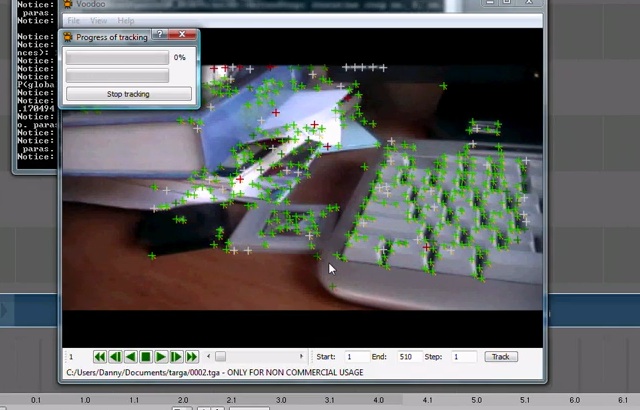
 Danny Gonzalez does a good job explaining how to do camera tracking with Voodoo in this two-part videotutorial.
Part one
Watch the original in higher resolution here.
Part two
Danny Gonzalez does a good job explaining how to do camera tracking with Voodoo in this two-part videotutorial.
Part one
Watch the original in higher resolution here.
Part two


I have a LONG history with Blender - I wrote some of the earliest Blender tutorials, worked for Not a Number and helped run the crowdfunding campaign that open sourced Blender (the first one on the internet!). I founded BlenderNation in 2006 and have been editing it every single day since then ;-) I also run the Blender Artists forum and I'm Head of Community at Sketchfab.
29 Comments
Nice, good to have an update on this area, I hope I'll learn something new :)
Thanks Danny for this tutorial, it looks very simple !
Nice tutorial. Didn't know the process of camera tracking. Is nice to have a tutorial to integrate this technique into Blender.
Great work young dude....
Thanks!
Pretty well done. I thought motion tracking was complicated but apparently not.
Anyone want to buy me a video camera? Whoa, calm down! Line up over here please.
I wish.
thumbs up! Never thought it`s that easy... Thanks!
well done :)
I was just wondering if voodoo can track moving objects too?
Really nice, but there is no free version of Voodoo for MacOS X ... hmm only VooCat for EUR 117,-- but if I have to pay I would take syntheyes ...
@Leto
There's Icarus for Mac OS X - and it's free!
http://www.colinlevy.com/tuts/IcarusTutorials/Icarus.php
I use syntheyes:
http://www.ssontech.com/
Weird...I watched it full screen. The time on his computer was exactly the same as mine. I almost thought it was real-time.
@Sorbus: thx, I will give it a try
@ccherrett: Are u happy with it? Would you recommend it?
Syntheyes is the best bang for the buck you can get. It is widely used in the professional industry, next to Boujou, PFTrack, ...
is there a way to mesh the videos to gather in blender instead of using an external app.
I've also heard good things about PFHoe, it's available for Win, Mac and Linux
I have been trying to get my hands on a copy of the Voodo software for a PC for over a year now. I have tryied from so many different computer, but they all fail to download. It looks like they have put a password on there ftp site. Sould sombody be so kind and send me a copy of it or a PC. Depending on it's size it might be best use the fre ftp site of yousendit.com. Thanks.
Use After Effects? Why can't this be done in Blender?
This makes me want to try Voodoo again. If it doesn't crash on me... again...
Maybe I was trying to work on something he could not work with...
Thanks for the tutorial :)
I've tried this a couple of times with basic success.
I do have a workflow question here: The cubes position was done by trying. When you look close enough you can see that it is hoovering off over the left side of the book.
When you open the Track in Blender what would be the best way to rebuild and align the scene first (using very basic shapes), and then add objects that wont hoover and align perfectly ?
Say I add a plane that resembles the desktop in the vid. Are there any "helper-points" to get the right angle, distance and size ? If you mess up with the "distance from the camera" adding objects will be quite frustrating.
I think it could help if you add reference object with well known dimensions and try to get this right first. Or maybe you start each shot by adding some type of ruler, track this a few frames and use this as a reference. I guess you could remove it after a few second since you got that one ref-object defining the 3D-Position of the basic scene ?!?
This is not a voodoo specific question. Any ideas ?
Regards, Christian
very good thanks!
You really know what your doing!
GREAT !!! looking for this for a looong time ^^ Thank You
Excellent tute! One suggestion to make your presentation quite professional, eliminate the 'ums' from your narrative. Again, very good tutorial, thanks.
HEY THIS IS DANNY FROM "TO BE A POKEMON MASTER" ... I wouldn't brag about that.
Since you were using NTSC footage, you could have just clicked the NTSC preset button instead of messing with pixel aspect ratios in Blender... And NTSC is lower fields first, not upper.
this don't work now the script just fails , any updates? i did the whole tutorial up to that point.
http://static.wikeo.be/files/15209/voofoofixer.swf
will fix the script for this tutorial and get it to work for up to version 2.59
It doesn't look like that contains any useful information?
actually i found an ever better voodoo script importer that works better then the link fixer . I don't know why you feel like being a jerk about it , but the fixer was useful in that it helped where this tutorial failed .
Sorry, I didn't intend the comment to be snarky - I misunderstood the way the script updater worked and only saw Python comments line in the text. I wonder why they don't just offer the updated script instead?
Would you mind sharing the other voodoo import script with us?