
Rotoscoping and Matte Painting in Blender

 Have you ever wondered how to create alpha masks for compositing in Blender? Well, Philippe Roubal has written an explanation on how to do rotoscopoing and matte painting in Blender, so check it out now!
Hi ! In the world of Visual Effects, Rotoscoping, Matte Painting and Garbage Painting are necessary and complementary functions. They are used each time a cut-out in the image is necessary, to remove a background or unwanted objects in a shot. They can save a video shot when Chromakey is not possible, or not enough perfect to achieve the desired effect.
I have searched for a long time a good and affordable software to do both Rotoscoping and Matte Painting, but without finding out “The” software, simple enough and matching my budget. So, I decided to dig more in depths with Blender in this way.
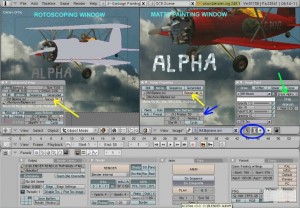
Finally, I have built a setup allowing Rotoscoping and Matte painting to be rendered in one pass, and generating a directly usable alpha mask.
This setup is ready to use and provided in a simple Blend file, with a PDF tutorial.
Download links on the top of the list on my tutorial page.
Best regards,
Philippe
Links



I bow before anyone with PDF tutorial download links.
Nice!
Check out his other tutorials too!
Back to the community thing ,damm .
I have ideas for this Blender but i dont want to fall to this markething
and start all over a new programming thig to fix it myself .
I still a user with my artists needs not developer ,so
for the 3.0 Blender version it needs a complete re-make .
Cause theres too much try for improve it to now a must to change it for better .
Very deep organizated simple falling to all complexity modeling needs .
It have already a nice custom interface but the menus and panels must be all rebuild
for this .
Whats whorng with this soup ?I want speak with the manager .
Lucas da Costa Dantas <- I can’t understand this guy! What the hell is he talking about ? Every post he ever posted around, is a complete nonsense.
Maybe there is really something unusual in his soup !o)
My hats off to those that have really good websites and information and tuts on Blender.
Thank you so much. Nice job.
@Lucas da Costa Dantas, this isn’t soup, this is casserole, if you want something like the soup then find it and eat. I much more like casserole than soup. Little metaphor.
this tut is pretty well done.
Brilliant, thank you for the tutorial and the blend file.
Thank you for your comments,
These last years, I have found much more help in tutorials through the Blender Community than I could ever give back, but I try to bring my little stone when I have both time and something to show.
Happy Blending !
Philippe.
1. The tutorials are great. I’ll dive into them a.s.a.p
2. Lucas da Costa Dantas is unfailingly totally incomprehensible. As always :)
Lucas da Costa Dantas – A fine Display of engrish, as for the tuts they are very useful
Lucas da Costa Dantas – Seriously guys, he sounds like he is using Babel fish to translate and post his comments. That’s how it translates… crazy.
Now, I have some fears :
As English is not my native language, I hope that my tutorials are more understandable !
I think we all owe Lucas da Costa Dantas a round of applause. We all know that none of us could type such random babling even if we were having a seizure on top of the keyboard.
Hey, lets not get down on Lucas for trying to post his comments in a language he is unfamiliar with, whether he is using an online translator or just doing his best with what he has learned. He obviously has something to say, its just that most of us can’t understand what it is.
Lucas, maybe you should post your comments in your native language. There are plenty of speakers of other languages here, and some of them post in languages other than English, so I’m sure many would understand what you are trying to say in this way.
Terence, I suspect you may be right. I’ve had a look at Roubal’s site, there’s some damn good tutorials and examples on there. Nice work Philippe!
Thanks for this tutorial and the project blend file :) Very nice work, and very insightful – I enjoy tutorials that explain ‘why’ they take certain steps so the user can learn more than just the steps to take :)
Bravo!
Thank you ROUBAL,
This is very helpful. And have no fears, your English is perfectly understandable.
P. Monk
Amazing… I was looking for a good tutorial about this last week… I’ll have to walk through this one tonight.
Sweet. Definitely something I am going to employ in the near future.
master, thanks for this
Do you know exactly where I can find some much more data or information?