

Almost two hours of tutorials about Sculpting with Blender

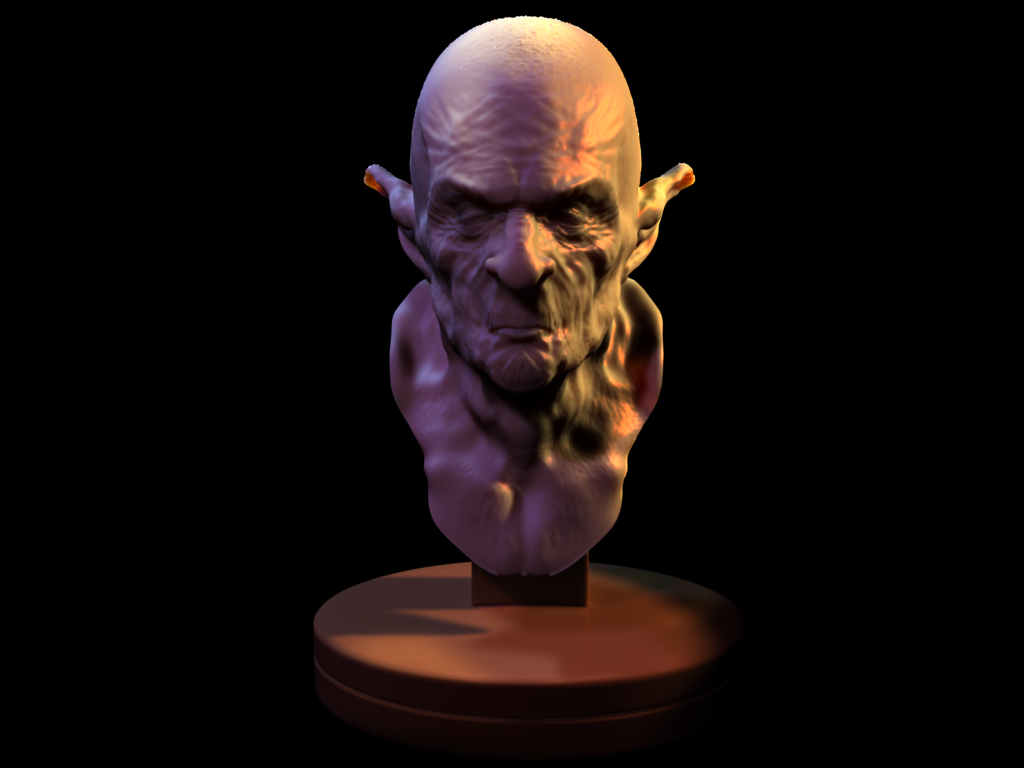 An artist from Brazil called Leonardo Davi published on his blog, a great collection of tutorials about sculpting with Blender. The tutorial was meant to be his final project, for a degree in visual arts.
In the tutorial he shows us how to model the head of a monster, in almost two hours of video. But, there is a down side in the tutorials, which is the audio narration. As you may be wondering, he is narrating all the steps of the tutorial in Brazilian Portuguese. So, if you don`t like the narration, turn down or off the sound for this videos.
You will find the videos (the tutorial has six parts) and all reference images here. The blog post, where Leonardo talks about the tutorials, can be reached here, and the text is in Brazilian Portuguese.

I.. am amazed by this.
I’m all the way for poly by poly :) topology control freak :) *I am*
Cool… maybe someday I will check into this. Thanks Allan! (and thanks Leonardo Davi too, of course!)
Bom dia!
When you see his retopolgy we really see here that we need “backface culling”/”dont draw backfaces” as a feature in blender for retopology.
Thanks so much! I’m gonna be using these videos this weekend :)
Couldn’t someone who speaks brazilian portuguese maybe translate? I know I would be glad to if I did.
yes, subtitles would be really nice :)
I guess an english version for some of the settings would be great, but a shortlist of some of the used keys/shortcuts would do as well…when you pay attention, you hear the “Shift”-s and “Grab”-s, although with a portugese accent…
And on the other hand, you can’t learn how to have talent, which Leonardo definitally has a lot!!!
@SeanJM: Totally agree. Can´t believe there still isn’t an easy way to disable backfaces in Blender….
How do you view the videos what program will run .oog?
many thanks
@surfDude88 it’s “.OGG” and you can use VLC player for it http://www.videolan.org/ (free/opensource/crossplatform).
@SeanJM, Miguel: isn’t the ‘occlude background geometry’ option in editmode what you mean?
Edit: hrmf, only seems to work in face select mode.
an option to “lock selection” of the backfaces would be neat!
hey bart where is the better memory management button =3
o_O
Those are “quite large” files …
Anyone has the smaller version ?
My connection sucks.
Yes, dial-up users still exist these days.
Bart: :-), the best thing I found was working in wireframe mode with my retopo mesh and the with vert groups, hide the stuff I dont want to see. But it’s slow to do it like that.
My first post has been detected as spam, so I write it again :
@ Bart, “occlude background geometry” works both in face, edge or vertex mode, but not in wireframe mode. If you want your object in wireframe, put it in wire in the drawtype button in object buttons, and solid or shaded mode “occlude background geometry” works very well.
I had very few problems with this in retopology…
Hope that’s an answer that could serve to SeanJM and Miguel. I haven’t seen the retopo video yet, they’re quite long…
This is a truly fantastic video tutorial! Gave me a very good grasp on what it is all about this sculpting craze.
After watching video #2, I was able to draw a similar goblin head in about 40 minutes, though less detailed and as proportionally correct. Until then, I thought tablet was essential for sculpting, but with the mouse it works just fine!
Basically, create a base mesh with some rough sketched geometry (because there’s no extrusion-like vertex-creating tool in sculpt mode), drop into sculpt mode, add multiresolution modifier and levels for it as you detail the mesh more. He basically uses just draw (d), grab (g) and smooth (s). shift+d subtracts from the surface rather than adding in general draw. He continuosly changes the force of the brush with f and view the model from different perspectives to see how the modelling goes. Oh, and x symetry on as well.
Really, sculpting for organic forms is very, very intuitive, like drawing in 3D indeed. In just 40 minutes I had a head far more detailed and realistic than any of my previous cartoony sketches by box modelling. No going back…