
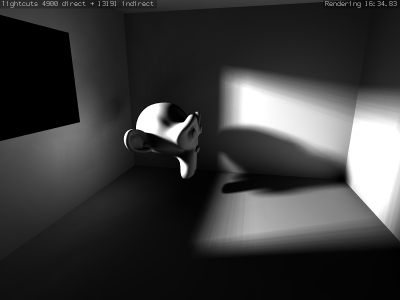
 It seems like SoC 2008 may add another extra feature to the Blender internal renderer. It`s because UncleZeiv, from the Lightcuts project, is working on a way to add indirect illumination to Blender!
If you want to know more about this possible feature, read this post at UncleZeiv`s Lightcuts blog.
29 Comments
Yay! Now we will finally have true Radiosity without tessellating the mesh. :D This will be very valuable for game level building where we want to bake radiosity into a texture. :)
What?! Yes!!!! Man, SoC rocks my socks. This. is. dope.
OMFG!
so DOPE!
yo =)
Yey!
This is great!
WOOO!!! Finally!!
I really hope this gets implemented. Screenshot looks sweet.
As long as the processing/rendering time isn't too long, this will be perfect!
Blender just keeps getting better and better.
Good. Very good.
This is awesome! Does it require raytracing?
Great!
While this is nice, it's a shame that Blender's - basically good - internal radiosity has never been brought to modern levels.
With the myriad of new features in Blender's internals, it would nowadays be a breeze to store radiosity information non-destructively without mesh tesselation, probably would take a day of coding.
Yes, I know, I could have done it myself as this is open-source, but well... just a thought :)
Actually, its a little shocking to think that this was not implemented before, but its great to see blender still moving forward by leaps and bounds. Great work.
That's what I thought too, but I figured I was missing something. Anyway, yeah, progress is always good.
Wow, Alexander Ewering, you have some talent! Go for it! I can't wait to see your Radiosity implementation tomorrow night... ok next week... just a couple hours a day and you'll have it!
AddZero: What makes you doubt that so much? It didn't take me longer than a few hours to make a "Copy Vertex Colors From Mesh A to Mesh B" feature that is independant of topology ... which was my way of 'bypassing' the 'destroy mesh' limitation of Blender's Radiosity :)
Alexander Ewering,
Well then I look forward to it :)
yeah me too Alex, go for it , i even dont mind if it takes you 2 weeks ;)
wow... what is the potential for this to develop into the ability to use hdri light probe textures and have at least a single color bounce easily?
ysvry / ccherrett: Dunno if the code is still usable in current SVN, I doubt it very much - it's 2 years old :)
http://pub.instinctive.de/copy_vcol.c
Sweetness. It's great to see the SOC projects coming along so well. So exciting!
Alexander Ewering,
As Ton would say "Show us some pictures!"
Blender's internal is getting better every time I visit this Website... I guess the next "big feature" will be photon mapping, caustics or other sweet rendering methods! Blender is becoming so advanced that some other software is offered for free? Look at Truespace 7.6 for example...
My secret plan always was at some point to get enough money to fund blender far enough to be on par with Max and Maya simply to prove that professional software doesn't need to be charged thousands of dollars/Euros. As it seems Blender has reachd that status before me ... :D
This is awesome news. Always reminds me why I chose blender as one of my production environments besides commercial software.
blender keeps getting better and better every minute!!
i just love this software.. :)
ccherrett: Pictures of a purely workflow and UI related feature? :)
The code just copies vertex colors from one mesh to another (which may have different topology). It can be used in this way:
1. Create your regular mesh as usual
2. UVmap it
3. optionally subdivide it for getting better lighting resolution if/where needed
4. Duplicate it, leave the duplicate exactly over the original
5. Do the radiosity calculations on the duplicate
6. Copy the vertex colors from the duplicate to the original
Steps 4-6 can then be repeated any desired number of times without ever having to touch / destroy the 'real' mesh.
NOTE: This feature was coded years ago when radiosity didn't even preserve UV textures...
This looks interesting, if only i could work out how to use it :).
Ive uploaded a 64 bit Linux build to graphicall if anyones interested.
I've never seen anything wrong with Blender's Radiosity before. Why do we need this? (Okay, so it's kind of faster) . And if I'm reading this, it's an automated method of simulating a radiosity process with extra lights to show bounced light.
Feel free to correct me if I'm missing something.
I can't comment too much on it since I never got around to ue blender as an actual Raytracer so much. So far it's more of a modeler to me. But if I'm not mistaken you have to subdivide meshes pretty oftentimes to get good results, no? The main advantage will be besides the speed up that you don't have to do this any more. Also - but I may be wrong there, too, actual light souces besides texture lights will be supported.
I can only explain how things work in Cinema 4D because i'm used to that.
Activating Global Illumination t the scene activates the light bounces and emmisive textures. That means regular lighs also reflect from a material to it's sourroundings depending on it's material attributes - including color and whatnot. Also light emitting textures also emit light to the scene. That means that you *can* light the scene by textue light only but don't have to. You can also use only regular lightsources and have the realistig lightbounce effect or both. Without the need to subdivide the mesh.
So if I got that right - the result in Blender works already pretty goodl but the usage could be improved. And it seems that's coming with this code version we have right here.
I hope I got that right so I am excited for the right reasons ;) :D
i would love to lirn how to do the motion blur test