

Blender Commander Released

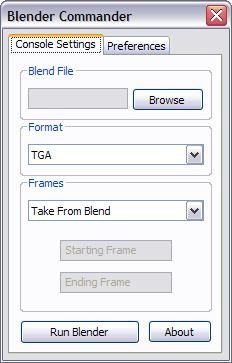 Christian Storay has released Blender Commander, a GUI for Blender’s command-line interface. It’s not open source, but free to use – as this is just an exercise I can understand that he doesn’t want to release the code (yet?). At this moment, it’s Windows-only but a Linux version has been planned.
Chris writes:
Blender Commander is an easy to use GUI front-end for Blender’s console
commands. It was written to make it easier for someone to render their projects
on multiple computers. You could copy your projects and BC on all of your
systems, and provided Blender was installed, span the project between them. For
example, you could have computer one render frames 1 to 1000, and computer two
render frames 1001 to 2000, and so on.BC makes this easier by putting a GUI over the console command arguments you would normally want to use, and with BC, you don’t have to use the Blender interface if you don’t know how to use the console arguments. This way, you can reap the benefits of running from the command line with the ease of a simple GUI interface.
This is my first wxWidgets application. I used Code::Blocks to program, and the wxSmith plugin (comes with Code::Blocks) to create the interface. It’s compiled with GCC.

Great idea. Especially for the lazy ones :P
Oooh, now you got my engines fired up to make an OSX one :) Creating wrappers for command line tools is actually very easy.
Unless I am missing something: where can this be found?
Damn, thats so useless, but he, at least it supports stupidity! By normal I should also flame about not releasing it under an appropriate license, but to be honest, it doesn’t really matter with this crap.
@AnyMation – oops! Link added, sorry.
WTF is wrong with you DustyDingo?
Noone has to shout out “that’s great” or whatever… but there is no need to insult him, especially if you don’t have any proper reason. “Proper” license? WHO cares. And maybe you think it’s useless, but why is that? Every fucktard can use the command line, this just makes it handier by removing the time for checking the cmdline options.
@Arnold: best strategy: don’t feed the troll!
Hey that’s great… I’m an old fan of ‘Blender File Renderer’ an application that did something similar, but is now unsupported (has disappeared really).
2 questions:
a. does it work on vista as well?
b. can it run batches (because that was one of the main reasons I used bfr). So that whilst one render job is running you can add another and/or reorder the list of files to do.
Oh Christian: if you happen to read this and want to see what they did way back when, I have a copy of BFR2 here: http://alienhelpdesk.com/files/index.php?file=bfr2.zip
It’s a GUI to a command line interface to a GUI? :)
“a GUI for Blender’s command-line interface”
Yeah… I can’t stop thinking of how paradoxical this is.
Just use QT4 for the GUI and have it cross-platform.
Dread Knight: in the BlenderArtists post he says he’s using wxWidgets, which is at least as cross-platform as qt.
Anyhoo, this looks like a simple but useful project.
Yeah, it’s nothing big, just for practice. I’ll do something more challenging soon. Thanks for all the positive comments!
As for the ‘license’, well, the program is sooo tiny, that I doubt anyone who seriously downloads source code for productive reasons couldn’t make a better program themselves. Also, it’s my first wxWidgets program, so releasing the source to it would be like trying to give away my first 3d model! xD
Howitzer,
No matter the size of the code base open source can work for you. So what if it is small.
Anyhow do what you need with it. It is your work after all :)
Hi! again Bart
Is almost identical to my little experiment using delphi for windows for batch render based on .blend files:
http://www.niel3d.com/niel2/modules/newbb/viewtopic.php?viewmode=flat&topic_id=422&forum=2&type=
Hi Madman, I actually have a program written in Python that does the batch rendering stuff. I haven’t released it yet because it’s not ready. I will probably rewrite it in C++ and with wxWidgets before releasing it.
Also, there will be no linux version of Blender Commander. I can’t seem to set things up right, and I don’t know the first thing about Linux. I will buy some books on Linux soon, because the job I want requires me to be well versed in it. But right now making a Linux version of this program is impossible for me. I will be sticking with Windows for a while.
It’s hardly free to use if it’s not open source. Unless he’s planning to port it to every platform himself, then the only way to make it usable for everyone is to release the source.
Thanks a lot for this GUI !
I hate the console, and for this reason I almost never use it.
This small Gui will be very useful for me.
I wasn’t aware of the command line rendering capabilities. Is there any way to pipe the render to a file?
I am interested in getting previews of blender renders for a Digital Asset Management system.
First, thanks to Howitzer for a very handy app.
Second, the open-source/free-software philosophies have been had an almost incalculable effect on information technology and even software design. Witness Blender itself. Unfortunately, every silver-lining has it’s cloud (to butcher a phrase) and the frankly toxic sense of entitlement it sometimes engenders is one of them.
figured it out, thanks anyway.
4 years ago i developed a simliar tool:
Florence Night Render:
http://blendpolis.de/f/viewtopic.php?t=2446&postdays=0&postorder=asc&highlight=florence&start=0
But with the more and mpre features of Blender it get’s outdated.
@Jose Sanchez:
>It’s a GUI to a command line interface to a GUI? :)
No, its a GUI for blender’s command line commands.
@Virgilio:
>”a GUI for Blender’s command-line interface”
>
>Yeah… I can’t stop thinking of how paradoxical this is.
I don’t quite see where the paradox is.
You can run blender in the command line without the need for running its GUI part. In other words, you can use it as if its just a command line tool. This method is used for batch or scripted operations, render farming, et al.
Now this Blender Commander is a GUI for that command line approach of using Blender. I do believe some render farming tools for Blender also work this way.
I’m merely pointing out what seems to be confusing. I don’t really condone nor abhor this Blender Commander thing.
It’s a bit like a McDonalds coupon book for vegetarians, but…
this is offtopic, but truespace 7.6 is free for a limited time. i believe blender can import truespace meshes, so i’m posting it here. look at http://cart1.caligari.com/web/Truespacemainreg.aspx it here
I really don’t understand some of the skeptical/negative comments above. Someone made a little tool that was useful to him and was enthusiastic enough to share it. If you don’t need it – well, you don’t *have* to download it ;-)
I think this is great.
I use the command line all the time for renders as they go quicker than rendering in blender itself, so this’ll save the aggravation of typos!
looking forward to the linux (preferably a .deb for ubuntu) version as i use both windows and ubuntu :)
how easy would it be to make a similar app for a windows client to tell a linux server OS to render something? at work I generally SSH into the server and manually set it rendering through that, which can be a pain having to manually cd though the folder trees.
any chance of a progress bar?