
9 Cool Video Tutorials

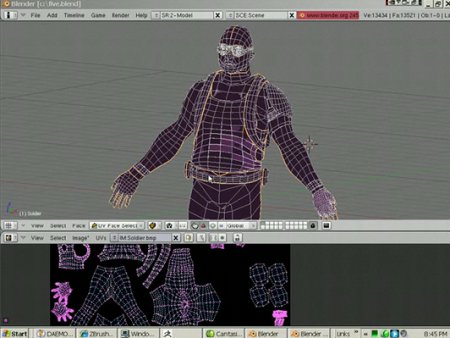 A very good set of video tutorials about Blender has been published by Jason Welsh, an experienced producer of training videos for cg.
All his videos about Blender are in Veoh, and they cover:
- Blender intro
- Blender Navigation
- Selections
- Join and Separate
- Merging points and edges
- Primitives and Subdivide
- Lattice Tool
- Retopo
- Booleans
- Blender UVS and Blender UVS HD
If you want to check out the videos, visit this link. And to watch other tutorials by the same author, about other 3d applications, visit this link here.
Ps: I know there are more than 9 video tutorials; we couldn’t prevent Jason to publish more videos. :)


talkin about open source… Veoh has sucky support for linux, buuuu!
I just stumbled upon those a few weeks ago.
Finally you post this! I reported this ages ago! ;)
Still check it out, and I really recommend his ZBrush tuts if you have ZB 3.1.
Watched a couple of the tutorials. They’re good, but not great. He looks under practised when he gets things wrong and even calls Blender Z Brush at one point. If I followed everything he says, I’d get really confused!
Lol, it was interesting when he was searching subdivide command in space->edit->edges->subdivide
instead hit ‘w’ and then subdivide and again w and subdivide or ‘w’ subdivide multi.
In my opinion he should really learn blender interface better first, then publish some stuff.
Another think join objects man… crl+j much faster.
Well, its really hard to watch anything on VeohTV on linux…
…probably should go mainstream and download wine o.O
In my linux box Veoh working quite well.
In my linux box Veoh work quite well. Got only standard software installed like mplayer, flesh player 9, firefox 3 beta 5, some free codecs and realplayer 11.
@Dread Knight, forks: Actually I found out that it’s actually quite easy to watch these videos on Linux.
What you have to do is simply find the ‘Download Options’ and then click ‘Original Video’. You can then watch it in MPlayer or VLC or whatever…took me a while to find it, but I was glad I did :)
The tutorials could have been a bit more prepared (he seemed a bit lost at times), but the UV-unwrapping tutorial still gave me a few good pointers :)
Thanks!
I though his introduction tutorials werent that good.
for example, his talk about rotating objects,and having to switch views to rotate it on different axes ? he should explain that it’s easy to enable to rotate gizmo.
Also, saying he didnt find any/many video tutorials is just stupid.. clearly he’s heard of google.. but i have doubts on how long he searched.
Just remember he is mainly a Maya and ZBrush artist.
He used Blender in his workflow thanks to the slick unwrapping tools, so made these vids with ZB artists in mind to show how to use blender in the texturing process.
He has a whole bunch of vids posted here
http://209.132.96.165/zbc/showthread.php?t=53087&goto=newpost
many of them REALLY useful!
Oh and when he referred to “no video tutorials out there”, I think he must have meant from a ZBrush to blender workflow perspective.
probably, from that perspective it’s good he has these tutorials. Although the points about pressing space>edit>edges etc etc being valid that the W key would be better, something we more regular blender users tend to forget is there are people who want to be able to find everything in a regular menu as well. For an “outsider” it’s really handy to be able to find stuff in the manu’s first, before learning all the hotkeys.
So yeah, not bad at all.
partially good partially not so…. I’ve discovered the usage of retopo paint tool, but next this same videotuto is so boring in following parts. I’m thinking about what Malefico said some days ago… sometimes it seems that anything related to blender is great by default. I’m teacher and, provided that i have’nt still done any tuto or vtuto, I can only say that teaching is not only show what someone is doing, is a matter of rythm, illustrate, explain,and many other things too.
In this order of things, the famous timelapse modellings tends to be a perfect waste of time.
My humble -as usual ;) – opinion
Raimon
A little OT here, but I tried to take a look at those videos, and I couldn’t… because VEOH BLOCKS ACCESS FROM MY COUNTRY! I live in Brazil, but it seems quite a few other countries, like Malaysia and Chile get blocked too, with an unhelpful “Veoh is no longer available in [your country]” message. A glance at their forums reveals that “Unfortunately Veoh has ended service in your countries due to a low concentration of users”. So much for free access to information.
Sorry for the off-topic comment, but I couldn’t leave it at that.
Hey,
Got the same problem as Jalf, i live in South Africa and that site is also blocked here. 3rd World Countries, hey ;)
Veoh is no longer available in Puerto Rico… What the… That’s funny, it worked fine yesterday. in any case hopefully somebody will youtube it.
Veoh is no longer available in Belarus …
http://www.youtube.com/watch?v=ujchqE2cm5E
Check this out, its about how you make Muzzle Flashes and Slideback on pistol. I know there are many out there but this is a very simple way to do it.