Two Quick Ways to Create Great Iris Textures using Blender

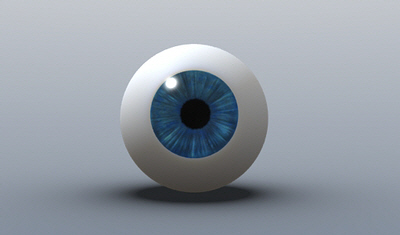
 Blender offers so much in one package that it’s always tempting to see what else it can do. “handlebar”, from the CGTalk forums, has found two very clever ways to quickly create excellent iris textures using Blender and was kind enough to create short video tutorials demonstrating the techniques.
“handlebar” writes:
Technique #1
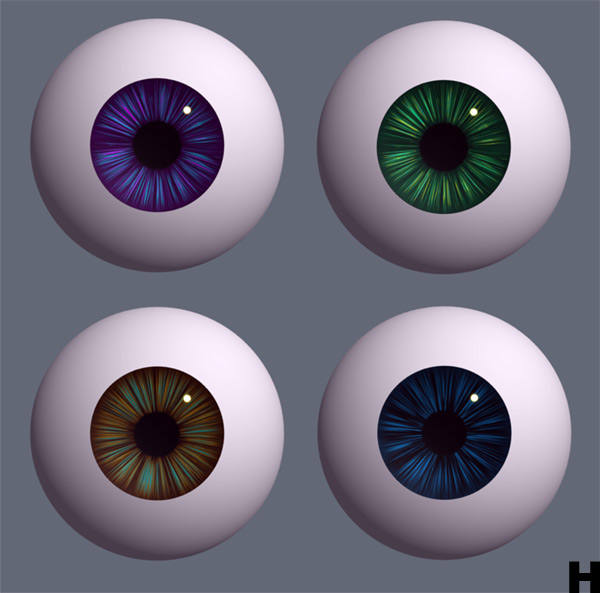
I’ve been looking for a way to create cartoon iris textures in Blender, these are my results so far. The whole process takes about five minutes to set up, from then on you can create numerous combinations of colours in seconds.
Technique #2
I also have another method using static particles that produces completely different results…It’s a very versatile technique so the video explains the basics of setting up the scene to keep the file size down. Please feel free to post your renders or settings that you find with the community so we can all learn from it.
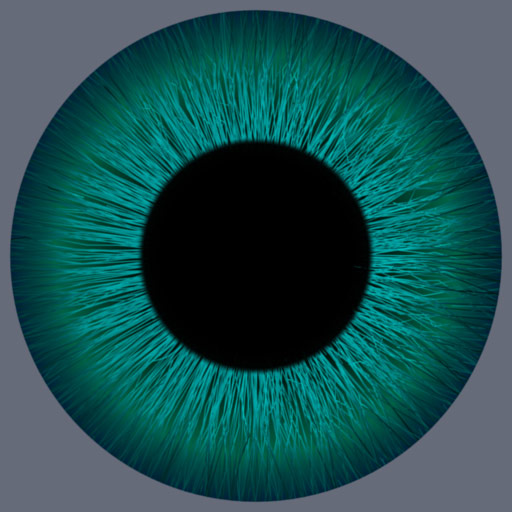
I had some time to check out the first technique and found it to be a very fast way to create some pretty interesting looking iris textures! These are my results after just about 10 minutes with a little bit of post work done in Blender’s nodes.
Be sure to post any of your results in the CGTalk discussion thread.


Hey handlebar – will you post this material at the Material Repository? =)
I love the eyes ^-^
Just a day or two ago I made a video that includes a really close-up look at MY EYE seen here:
http://youtube.com/watch?v=Ncb9xvVK5eo
For those wondering, the reflection is a single fluorescent light bulb. Therefore the actual color of my iris is different from this video because fluorescent light has a broken band spectrum. Keep that in mind if you find more resources outside of these tutorials.
A good friend of mine who is a real genie with Photoshop once wrote a “tutorial” animated gif on how to make a quick iris, but I’ll need more time to dig it up. I’m fairly sure that it involved the Polar Coordinates filter.
http://gurusnetwork.com/tutorial/polar_coordinates/
Both the tutorials are great. To make those radial lines a bit more curvy you can use proportional edit and rotate the iris ring slightly and in the particle version you can use 2.46 RC1 combing features to give more variation to the particles. The texture can further be enhanced further in either GIMP or Photoshop or with composition nodes.
Nice tutorial the first one, have not looked at the second one yet!! Thanks …
Also, don’t forget about the new curl and wave features of the new particles system. Using the particles technique you can achieve even more realism. Especially if you have multiple “layers” of particles with different settings and textures.
As luck would have it I have the same idea. ;-)
I use also the particles.
Here is a link to my site.
http://www.animation-project.de/eyes.php
Regards wuerzie
Thank you, Handlebar! Both of these methods are very useful. I’ll probably use them both in the near future. Though for tutorials you make in the future, I’d like to request faster pacing. I hate to say it, but I actually started falling asleep about a minute into the second one. Most of the information in both videos is excruciatingly basic — it’s a lot to wade through to get to the gems of info regarding the actual iris texture methods, which are really quite good. Thanks again, and thanks Kernon!
That’s great, thanks.
I really like the theme in the second video.
¿is it available somewhere?
Thanks for sharing! I have been struggling to get great eyes – but not anymore.
These are great tutorials!!!
I give you extra points for explaining every key stroke in your tutorials. I think that made your tutorials better than many others because there was no guessing as to how you got to each point in the project. I would encourage you to make more videos and keep the pace exactly as you have it. Being relatively new to Blender I appreciate you attenditon to explaining the details.
Very nice. I enjoyed and learned from both of them. =D
Hi, Thank you a lot !
Two very clever and fast methods.
Before I spent time on drawing my textures in Gimp, and they were not so fine !
These are very clever techniques. But I think where the iris meets the sclera (white part of the eye) needs to have a bit of blurring. If you look at your own eye in the mirror, you’ll see that it’s not a hard line around the iris, it’s more of a fuzzy blending. So this blurring could be done in post-pro and make the eyes even more realistic.
Excellent! Thank you Handlebar to make these tutorials! They just started to come in handy.
Also the tutorials are created in a good understanding way!
nice… this is just what i need for my character in upcoming short film.thank you:)
Can somebody repost these tutorials? The links are broken.
The first one doesn’t work, says it was removed, can you post these vids on youtube / vimeo?
The links dont work
yeah it does not work :((