
Zmask Rendering

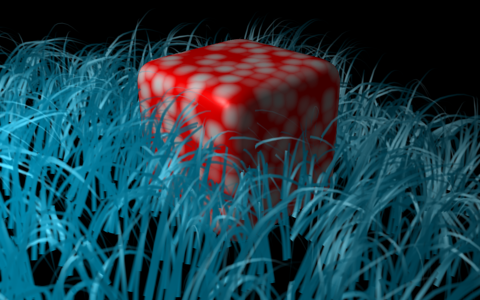 In a previous article we spotlighted changes made to diffuse shading. The latest news is that Zmask rendering has been implemented and it now gives us the capability to create some complex composites.
Quote from Blender.org:
When you set up a scene for rendering, you typically want to separate a character in its own render-layer, for vector blur or color correction. Compositing it back in an environment then can be complicated… for example when the character stands in a grass field.
What you then need is a special render-layer, one that results in an image containing only the grass in front of the character. That is what the “Zmask” feature does for you.
More information can be found here. Check graphicall for builds.


I’m not really wow-ed yet, but then again it’s these little basic things that help you build the big cool stuff later.
Well, I actually am wow-ed. Think about the possibilities. When comping in live footage, for example. A very welcome addition.
I have to agree with Joat. This is an excellent new feature indeed.
Can anyone advise if these sorts of additions have the possibility of being implemented as plugins, even python scripts? Material and composite nodes, modifiers and constraints seem like good candidates for plugin architecture. Just wondering…
@Apollos: PyNodes?
http://wiki.blender.org/index.php/BlenderDev/PyNodes
this is great! i’d like to try this with complex scenes rendered out in other 3D apps where it would just be too processor intensive to import the files as obj/3ds whatever.. cool!
Thank you Felix. I love it. =D
All of these new rendering tweaks are awesome. I’ve loved playing with the new AO, and now I get to play with this.
What’s the difference between using Zmask and the ZCombine node? When should we use one over the other? I just downloaded the blend and hooked up a zcombine, and the results are different. The Zmask looks..better aliased. Does this solve that old problem with aliasing when something was way in front of something else and there was aliasing at the edge?
it doesnt look cool enough! i want t osee an amazing awesome example!
……………
ok enough ridicule =P This is gonna be so handy i’ve had trouble in the past putting characters amongst environments this will make it so much easier!
Praise Blendallah!
Thank goodness! I had to change the final composition of a past project because of the ‘grass problem’ (although there were rocks involved too). This is exciting indeed…