Video: Volumetric Light in Blender

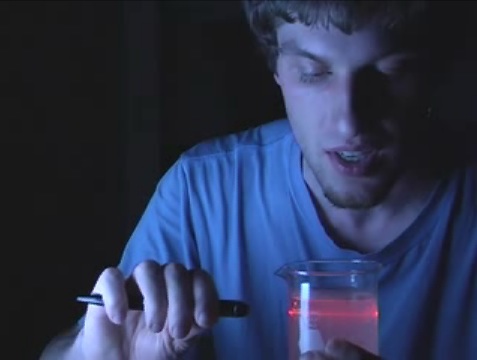 Another great video by Chris from welcometochrisworld.com! I just wish it didn’t always end up with this stupid grin on my face after watching his work ;-)


Another great video by Chris from welcometochrisworld.com! I just wish it didn’t always end up with this stupid grin on my face after watching his work ;-)



Wha? My gosh. I’m here again? Well thanks.. I’m hoping to do better in the future! so thanks for the encouragement!
Well it was pretty cool, but it wasn’t very, very much in-depth.
Furthermore cool. :)
Why did you subdivide the plane?
One of the best presentations I have ever seen (ok the content wasn’t stunning but it was enjoyable). Chris should be hired by the Blender Foundation to help bring Blender to the masses. I.e…..the two people left in the world who haven’t yet tried blender.
Yeah. Stupid grin indeed! :)
Your editing is great. What tools do you use??
Hi good video
What’s kind of camera that you use for shot this Video?
It’s not very helpful (that part about values which “does something but I don’t really now what” was nice!), but you look like a person with passion and great sense of humour! And that can be as good promotion of Blender as a well written manual.
love it :D
I agree that this is absolutely not an in-depth video, but the presentation more than makes up for that ;-)
*stupid grin check: yup, still there*
Here’s the .mov for those who want to download it http://blip.tv/file/get/Sirhcsenots-VolumetricLight159.mov
I think that some forget how much we did learn from this little bit:
– what is volumetric light
– how to change lamp attributes in blender (and how to create a basic scene to test them)
– how, when carefully positioned, you can get good video quality in the kitchen
What a relief from the usual blurry crap we see on YouTube!
If nothing else, make a video tutorial about how to make them that neat and clear.
When you don’t know, ask around. It’s kind of a duty to be of service when you make tutorials you know…
Thanks for showing this to us.
Jean
hmm, just checking on the halo rendering isn’t all. blenders halo lamps need more tuning to look good, like smoothing the borders of the cone… I personally think this isn’t by far a pro tutorial, but for the beginners it might be ok, to find the buttons if they can’t read
i missed this fonction in blender’s internal renderer (i was using yafray), thanks for the tip, and nice video ;-)
Very entertaining. For more in-depth info, all of those other 6 or so numbers are explained in the user manual:
http://wiki.blender.org/index.php/Manual/Volumetric_Halos
Very well made video. Definitely should keep up the great work!
Thanks alot for this Chris….
Chris has also made a video appearance concerning AAO here:
[url=http://www.graphicall.org/builds/builds/showbuild.php?action=show&id=585]http://www.graphicall.org/builds/builds/showbuild.php?action=show&id=585[/url]
Looks to be recorded it at the same time as this vid.
Cue stupid grin no.2! :D
I’ve been thinking for a LOOOONG time about doing video tutorials in a very similar style, and though I haven’t done it yet, I’m glad that someone is. Bravo.
Really presentation video! It’s this kind of video that makes you enthousiast to try things:-), cool!
The editing is top-notch. It really is a great presentation.
@Goosey: This should be kind of obvious, but staying on Blender websites for too long will make you think that more people know about Blender than people actually do. To most people, (graphic pros included) Blender means a machine for mashing up vegetables.
Chris, thanks for this. It was great fun and good clear information. I especially liked you use of props ( the beaker with the cloudy fluid and the laser.) Keep up the good work.
Actually I think this video is pretty cool.
I was never able to figure out how to get this lightning effect.
Additionaly this guy is pretty funny and watching this is alot of fun, too!
So fun + lerning = best combination!
Sorry for double posting but really this needs to be rectified.
Dramaking:
I don’t know of any pro that hasn’t heard of Blender nowadays.
Many have included it in their pipeline, especially for uvmapping.
Blender users are in all the important forums, publishing, winning prizes.
Blender is on FP of Slashdot (pouah!) and Diggs on a regular basis.
There are regular articles on Blender in the best CG magazines.
I don’t know where you take your information from but Blender isn’t ignored anymore.
You have to understand that that video was made in response to a viewer question. And at the time I wasn’t expecting so many views. (I never do) But by surprise it is viewed. So you can be sure in the future I’ll find out about the extra values and write them into the script. Besides, I have so much motivation now. :D
About making it look good on Youtube- notice that the video uses only a small area that follows the cursor around on the screen, instead of showing the entire screen all the time. This lets you get the most out of the limited YT resolution. Also it’s pretty short, I think the shorter videos may get encoded with higher average bitrate than longer ones. For the live video, using closeups with the background out of focus and/or dark gives you more bits to get quality on the important foreground detail.
I think it’s great! Nice job Chris. You have a new calling!!
Haha I loved it
Looking forward for more!
Fantastic tutorial. Not too heavy for someone getting their first introduction to the topic. And the part about not worrying about all those extra buttons – I love it! Incredibly comforting to newbies who might still be intimidated by all that Blender can do.
OK, now I’ve got a stupid grin on my face too. I have uses for this effect, in fact I think I’ll be using it in my next rendered image in Blender, I didn’t realise it was so easy to get it! I’ll experiment with the other vlaues and read the manual to find out what they do, heh heh.
The good quality isn’t necessarily because he has a high-end camera. The good quality is from good lighting, good video compression, and good technique.
You can see this explained here:
http://www.digitaljuice.com/djtv/segment_detail.asp?sid=116&sortby=rating&page=1&kwid=0&show=all_videos
And if you like that video, there’s a bunch more here:
http://www.digitaljuice.com/djtv/default.asp?sortby=rating&kwid=0&show=all_videos
yup… im the guy who asked the question.. i was stunned to see this on blender nation! great job, chris…
as of now i only have 2 videos on my youtube both being blender and both sucking.. im hoping thanks to chris and various tutorials similar to these, they can help me become better at blender.
Well Adam, thanks for the question!
Funny guy! hehe
LOL. I love the video. It’s not in depth, but just the way you talk seems more like a performance than an instructional video. I love it
This tut really helped me on one of my projects. I was wondering though if there is any way to perhaps assign a cloudy texture to tweak the appearance of the halo. I remember being able to do this in C4D which helped break up that all-too-perfect computery gradient.
” there are only 4 to 6 buttons to play around with… ”
LOL… So funny.
like this vid