
Mesh Deform Modifier

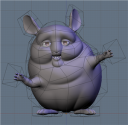 The Peach project is already giving Blender a new Tool! It`s the Mesh Deform Modifier. This is a very cool new tool, which allows us to deform a mesh object, using another object. The modifiers works like the Lattice tool, but we can shape the deforming object with almost any kind of shape.
To try out the Modifiers, use these SVN builds, available at graphicall.org:
After read all the instructions, you still don`t know how to use it? Don`t worry, let`s take a look on how to use the modifier, with a simple object.
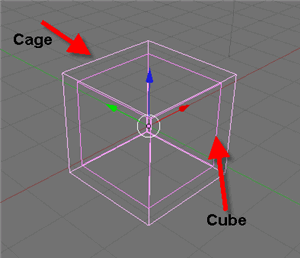
Let`s use a simple scene, with only two cubes. Try to align the two cubes, just like the image below. We will call the big cube “Cage” and the small one just “Cube”.
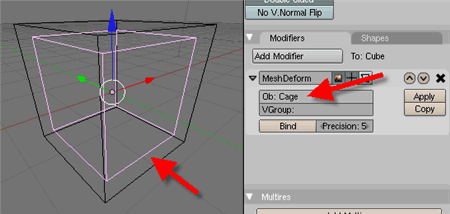
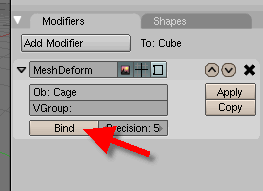
To finish the process, press the Bind button. It will bind the objects, and make the deform works. It can take some time for the bind process to finish. Just wait a bit.
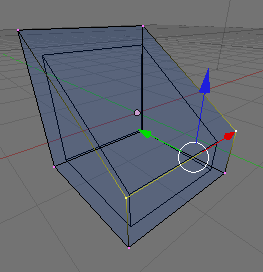
Select the “Cage” and in Edit Mode, try to change the shape of the mesh. It will deform the small mesh object!
That`s the basics, now you can try to deform your own objects. Have fun!


Yes! VERY AWESOME!
yeah i have been playing with it for a few days and this is going to make rigging and deformation(shape keys) 10x easier because you only need to rig the cage.
Yes, it can do a lot good for rigging.
This is great, but maybe there should be a requirement that the cage has a basis shape key? That way, it would be possible to rebind things accurately after changes have been made!
I would advice the people to use most recent SVN builds for this kind of new features.
e.g., ton commited this (today, minutes ago):
Log Message:
———–
Revamp of multi modifier option!
– error fix: overall weight group value was used inverted
– added “Inv” button to make weight group work inverted
– added bigger, more clear Multi Modifier button
Will it be possible to define the lattice as a softbody ? It would be great to be able to compute the motion of a cloth with a low res object, and to deform the hi res object according to the low res object :) (sorry if my english isn’t understandable…)
Wow!! it’s a long time i was missing a feature like that.. and i missed it very much also in propretary software. i’ll never get used by the incredible blender’s surprises !!
wow, a nice feature :D
Pixelvore: The lattice isn’t an actual lattice, it’s a mesh. It’s a cage, which just means one mesh controlling another mesh. And since any mesh can be a softbody, yes you can softbody a low res object and have it control a hi res object. The only problem I see with that in terms of cloths is that the folds and creases and such will be based on the low res object instead of the hi res, meaning you won’t get the precision or detail of just baking the hi res object as a softbody. Where it comes into play however is for controlling “fat” characters, you could soft body various parts of their anatomy to jiggle based on the low res mesh at a faster speed than if the hi res was rigged with baked soft body movements.
Thanks Midian, I know what you mean. But even if you don’t get a lot of details when baking the low res mesh, it’s far better than having to wait hours to get a sometimes irrealistical animation^^ I think that this tool may be useful to set the parameters of the softbody system, and when you’re happy with the results, you can switch to the high res model…
Is there no OSX build available?
I highly recommend the newer build from November 12th. http://www.graphicall.org/builds/builds/showbuild.php?action=show&id=542
omg… this will open a new era of rigging in blender ( for toon and face control , it will be paradise…..)
thanks Peach for good work
Midigan:
Though I have not tried it, I don’t think it would be that easy to try out parameters on a lattice-mesh and then transfer the parameters to the fine mesh. Afaik soft body is dependent on the resolution so doubling the resolution won’t give the same result.
For such a simulation you would need some kind of descrete differential geometry setup. I’ve seen some groundbreaking stuff done with that!
So basically what you have now is the same as what you would have if you would do a soft body simulation before a subdivision surfacing. Though I guess now you would be able to take this even further up do a lower dimension.
Development is taking off again. By including advanced tools like this Blender is slowly getting the edge on commercial packages.
its great that they’re makin all these new features, but its somewhat unfair because these kinds of changes wouldn’t have happened if it werent for the peach project – meaning that we’ve got to wait for a project like this before these things are added. :/
Jeepster, I strongly disagree that this kind of feature could not have been implemented otherwise, I think there are plenty examples of such features that have been added by volunteers outside of this kind of project. And even if this was the case, I can’t understand how that would somehow be unfair.
Someone just gave away days of their time to implement this into Blender out of good will, and Jeepster says it’s not fair because improvements are made more often during big projects.
jeepster: yea! it’s totally unfair. also i don’t understand why they keep releasing new versions so slowly, or at all. all the features should’ve been put into the 1.0 release ten years ago!
and where is my coffee???
.b
I don’t know about using it for a kind of multi res softbody, but where it could be useful is for soft body conforming clothes maybe. I’m making a character right now with a nice fat dress, kind of like a kimono, but using bones is difficult because of the ‘fatness’ of the object. Perhaps better control of the rigged part of the soft body could be done with the mesh….
I’m not going to experiment with that right now though. :) I’ve enough on my plate learning the current features.
great work brecht, but blendernation seem to forget what other cool new things that are in svn like pyConstraints, glossy reflections/refractions , new weight paint visualisations, and all the new things for the GE aswell
mmmk im wrong :/
Hopefully a mac intel build is in the works ( I’m still learning how to build blender properly , I’m not a programmer ).
Nonetheless my humble thanks to everyone responsible for the tool.
To really appreciate the power of this stuff, check out the videos to the harmonic coordinates papers (there are two of them I think. The 2nd is amazing). Thanks for putting this in blender.
Hello
I do actual builds for OSX nearly every week.
SVN / particles / bmesh / qdune…
Why do none of the admins here see it ?
Keep an eye at GRAFICALL !!!!
Greetz…Jens
Mega cool!
Truely, this modifier is a bliss for animating fat characters… Or animals, like dinosaurs, elephants… big mastodontes :)
Adding shape keys to the deformer mesh could also allow for some bulging too… Without the hassle of moving every single vertex from the hires mesh… So facial deformation too will be easier…
And hairs? Mesh hairs built with planes deformed by a lower res version with some dynamic…
Simply amazing and certainly wanted by all animators for a long time :)
OMFG!! This was *exactly* what I needed!!
Wow ! One more time they did it !
Thanks a lot to the developpers.
Blender is growing up with new leaves in all seasons !
Awesome.
Wow. Definite cool stuff to use when rigging.
Thats possible to do with a lattice right?
No, a Lattice can’t do the intricate topography of the character’s arms, legs, etc. In the Pixar paper’s video, the differences between lattices are demonstrated.
Oops, hit submit before I was done. The lattice cant do all the arms and legs as one mesh, as it’s too complicated, but this makes the mesh deformation much more straightforward.
Jeepster: You’d better believe you are. :p I mean, seriously, considering you’ve spent… how much money, in your endeavors to help the project?
Beautiful tool and what ever new idea to blender – stick in the next release.
Excellent feature ive been playing about with the SVN 12th NOV build for the last few days and believe me it takes hours off the rigging time :) Currently trying to build a flower sac like the 2d Excercise but for 3d similar to this one on Cg Talk http://forums.cgsociety.org/showthread.php?p=4786150#post4786150 but am having problems with an stretchy FK spine anybody know of a good work around for this ??
@Mike
I found an Mac Intel build here:
http://www.graphicall.org/builds/builds/showbuild.php?action=show&id=523
Carlinhos: Thanks I got it.
Its pretty sweet. It takes a moment to bind – but once that’s through its really fast.
Its as fast as a normal lattice! Rock on! This is gonna add a whole new level of ease to rigging.
Thanks again to anyone involved.
Very nice. I always hoped someone would add this into blender itself, as it existed in script form many years ago.
Thanks to the devs behind this :) !
Nice :-)
Sorry I didn’t read all your posts, but — Will this be the end of the lattice modifier or an new “extension” to it?
thx
How do I make the cage transparent – only wireframe????
Aleksander: go into the object buttons (F7), and in the Draw section, under DrawType – choose Wire.
In other, more disgusting news: why are there a bunch of spam links at the bottom of this page?
Can it fix forearm twists? Cause that would be easy and wonderful