

 Glossy reflections and refractions in the internal renderer has been wanted by lots of users for a long time. Now development of a new patch doing this is shaping up. Matt Ebb (broken) is developing this patch with the assistance of Brecht, the developer of the Sub Surface Scattering in Blender 2.44. The results so far are very interesting.
From Matt's blog mke3.net:
Previously, I've grumpily complained that there aren't enough people interested in working on Blender's internal renderer, and so it was only fair that I put my money where my mouth is. I mentioned I'd been doing some coding recently, and this is one of the products of that time: blurry/glossy reflections and refractions in Blender's internal raytracer. It works similarly in concept to yafray's ‘conetrace', sampling a cone of rays around the current pixel to get an averaged, blurry result. The sampling is using a quasi-monte carlo Halton sequence, which Brecht van Lommel previously converted into C code in an old experiment of his, and which he gave me a lot of valuable help with - thanks a bunch, Brecht!
This has been quite an interesting (though sometimes frustrating) learning experience for me, diving into a new area of Blender's source code for me, and learning about many concepts I was previously unfamiliar with. What I've got so far probably isn't perfect, but I'm very happy with the progress made so far. I'll post again soon about some of the process and things I've learned so far, hopefully in a way that people not used to reading technical SIGGRAPH papers will get some value from. But for now, here are some pretty pictures, and a patch! There's also a bit of discussion in this thread on blenderartists.org, too.
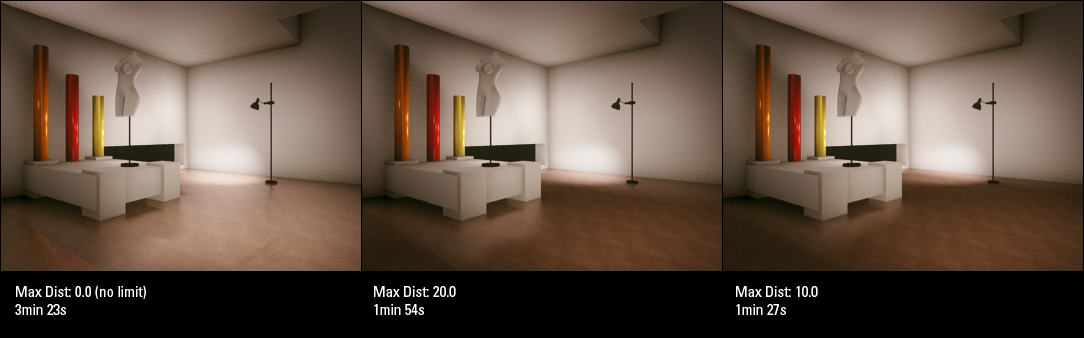 Matt has provided a Windows build for testing purposes in the thread mentioned above. Please let him know if you find any bugs. Be sure to read the thread! It has lots of images and good explanations along with them.

40 Comments
Hummm, very wanted feature.
YAAY!
Nice i will try this out!
Great! Thank you Matt!
Sweet! So amazing! Blender is going to be a mad open source software! Yay for GPL!
Dm7: Blender IS a mad open source software. It's only getting better!
Thanks a lot Matt!!!! This is great for archiviz.
This makes me so happy, and my reflections so blurry!
That's GREAT!!!!
after "solid SSS" (like skin, or such), blender now get's transparent SSS (like unclean water) :D :D :D :D
and the glossy reflections also look great!
Great Feature!!! It improves the internal raytracer so much! Keep on going!!!
This looks awesome
broken and brecht, great job; having the internal renderer have more examples of advanced rendering techniques is awsome
damn.. i'm on osx..
Great job !!! Blender Internal is improving with very nice features lately...
Marvelous!!!!!
kl - I will try test this if I get the time - render features are always nice to have added!
-epat. :)
great feature!!!! thanks a lot!!!
thondal - damn.. i'm on linux
Excellent, I'm downloading the patch now, but isn't a linux version, too bad :(
That's pretty awesome, and it's something that will add a lot of realism to renders. Could you use a similar method to provide (pseudo)soft shadows with raytracing?
@Blade
Here is a Linux build.
http://www.graphicall.org/builds/builds/showbuild.php?action=show&id=429
I haven't tried it yet but it looks great!
Everyone: You're welcome :)
M.B: Yes, not 'pseudo' though, but accurate - I've started investigating it already. I think there are some optimisations that can be done in that area...
@Matt: That's awesome. Keep up the good work!
Just add ibl (image based lighting) to the internal renderer and I don't need Yafray anymore :)
Add HDRI and GI into Blender internal, and we can replace Yafray! Then, make an option to have the Blender internal an unbiased render engine, and we won't even need Indigo! Then program an artificial intelligence into it, and we can RULE THE WORLD!!!
Seriously, though, this is awesome!
Sweet!
Tynach: hey man if you can figure out a robust compositing pipline with yafray using all passes then please post it. I for one have tried to use it and yafray is not fit at this time for robust compositing. IBL in the internal would change that but so would the new render API.
You've got to be kidding me! I'm just rendering a long animation where I created this effect with nodes. If only this would've been available in the last release!
This is great news, another very important addition to the renderer.
I found this to be a usefull document:
http://www.mymentalray.com/mymr_downloads/architectural-library.pdf
Can't wait next blender release.... With glossy reflexion, and tile procedural texture.
wow... nothing is growing faster than this release...
maybe in next release there will be caustic effects in the internal render... ;)
I downloaded it an tested Suzanne with fuzzy reflections. I like it!
Nice work! We've needed this for a while! So would it be possible to use the same or a similar technique to get soft shadows similar to using an area light but without the additional overhead of raytraced passes? Just curious.
"Nice work! We've needed this for a while! So would it be possible to use the same or a similar technique to get soft shadows similar to using an area light but without the additional overhead of raytraced passes? Just curious. "
the way this works is by using extra raytraced passes i think.
I love it. Blender is growing so fast it's amazing!
Quick question. I'll test it out when I get a chance, but how's the rendering speed? A normal raytraced sphere vs. a glossy raytraced sphere?
Whoa! Dev pace is too fast, I'm still struggling with 3D paint, now a new (serious) feature is up...
Congratulation!!!!!!
Kind Regards,
BS
I don know why people still guess Internal Renderer is not good enough. There are a bunch of things that other renderers still did not do that Blender surprises a lot of people.
Please, Install a photon Lamp, QMC, this patch, dispersion and everything in the world will be unusefull to stop Blender. And I tell more. internal Renderer is good enough, one way or another, if you learn, you will achieve better results than any other renderer !
This is quite cool! I was on a lunch-time walk a few weeks ago, and while looking at the shadows cast by the trees, something became quite readily apparent. The shadows were well-defined toward the base of the object, but became increasingly blurry as the distance from the surface increased. Will this patch work with shadows, or just reflection/refraction?
Just reflection/refraction. Improved soft shadow sampling is on its way ;)
I really appreciate this. Is it possible, though, for the Yafray plugin to utilize this interface for conetrace? Or will it be lke SSS, which only works for Blender even though there is a similar Yafray feature?
It seems there is no longer windows patch in the net!!!!!!!!!
Somebody help!!!!!!! Where can i find it?
There is also information that blender 2,5 should include "the patch".
I work with 2.5 but I can not find any solutions for Glossy Reflection-refractions.....
Is it thrue? Help ! .... and thanks