
New Procedural Tiles Texture in Blender

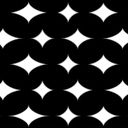 A new and exciting type of texture is being developed for Blender! And yes, builds are available so you can check it out…
The developer, known as “Wizard”, writes:
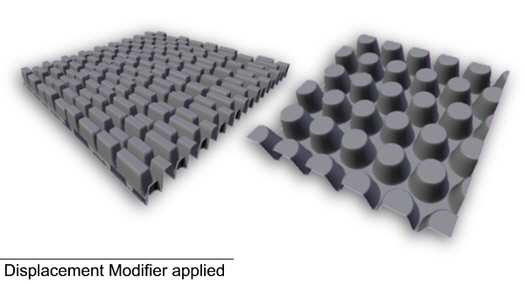
This is a new texture type called “Tiles”. When you add a new texture, you will be able to select it much the same way as any other texture like Clouds, Musgrave, etc. Currently it supports intensity and bump mapping but no colour.
I’m currently working on investigating ways to generate preset tiling patterns. However, this may not be available for a while. I was hoping that people would pick up the build, play with it, give me some feedback and report bugs.
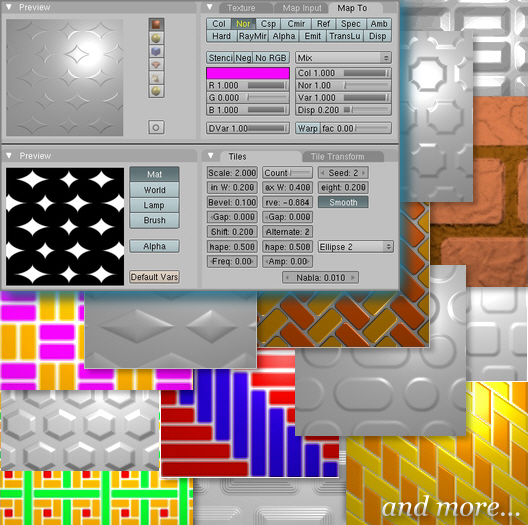
The following parameters are available in the interface:
Scale: Sets scaling
Count: Number of random tiles
Seed: Seed for random number generator
Min W: Minimum tile width
Max W: Maximum tile width
Height: Tile height
Bevel: Tile bevel factor
Curve: Adjust the bevel profile
Smooth: Smooth the bevel profile
H Gap: Horizontal spacing
V Gap: Vertical spacing
Shift: Tile shift
Alternate: Number of tiles after which shifting starts again
H Shape: Tile corner horizontal factor
V Shape: Tile corner vertical factor
Corner Style: Tile corner type
Freq: Frequency of wave function for bevel
Amp: Amplitude of wave function for bevel
- WINDOWS build made with MinGW (6.7MB zip)
- LINUX build made on Ubuntu (5.2MB tar.gz)
- Patch in case anyone is interested in making a build for the Macs
- Keep up with the latest patches in the Tracker.
- Here’s a blend file with 5 examples. Layers 1 through 5 have a plane, each one mapped differently with the textures. Layer 4 demonstrates the complex brick setup and Layer 5 demonstrates complex tiling using nodes/uv map (not the greatest example but it works).
- Keep up with the latest developments in the forum thread.


Hey nice idea, Im glad to see someone is still
trying to improve the procedural textures, with nodes aside, I think could they really use it. Also its a nice choice geometrical patterns for bump maping will come in handy.Thanks for sharing. Any chance I might convince you to come up with a high definition cloud procedural, so we could finally make photorealistic clouds ..an maybe even fire ??
looks cool :D
but no osx build available, snif :(
that’s great!
In combination with “wood” and slight “cloud” you may get nice oldish parquet :)
@ alex: aren’t proceduals “infinite” high res? Dunno….
you can scale it as wished and there will be more detail. and the colours are floats instead of 256 different values, as far as I know…
@Kram1032
Maybe what alex meant was clouds which look better, the currents clouds look good but don’t exactly look real do they?
Although I think ‘clouds’ wasn’t really intended to be used as a sky texture, more of just an effect to apply to things to achieve just the right look, like the example Kram1032 suggested:
“In combination with “wood” and slight “cloud” you may get nice oldish parquet”.
The best way to achieve photorealistic clouds in blender in my opinion is to go outside (seriously go outside blenderheads, it’s good for you :D) and if it’s a good day, take a picture of the sky and (after a little Gimp or Photoshop [or in my case fireworks]) use that as your texture. If your house is up high and you have access to your roof then hop up on top of it and take a picture from there. Since well, nothing looks more photorealistic than a photo right? YTO?
YTO – (I’m starting a new internet chatting acronym, today, this very moment, take note of this, this ‘YTO’ shall now be dubbed from this day forth as ‘Your Thoughts & Opinions’ – meaning basically ‘what do you think?’ if it becomes popular then I’m make a wiki page saying I was the creator, then I’ll sell the rights to it for millions!!! Muhahahaha)
Very creative!
Thank you very much!
Now that’s a great relief! I have been looking for something like that for a long time!
That’s a REALLY neat feature. Thanks a lot for that, Wizard, and thanks Kernon for sharing!
Cheers
I got quite nice clouds from the proceduals…
not perfect, but nice.
and: don’t quote me to my own example xD, that’s kinda strange ;)
dunno if this is related to it but, when i use the blender file in the .zip (windows) and i choose to render it as an AVI codec, i don’t get to choose my codec. as shown here: http://img174.imageshack.us/my.php?image=wtfej0.png
and a little offtopic: will there ever be a function to render as a .gif animation?
I just tried the windows build. Works fine and will be very helpfull in many situations.
Is there a chance, to get a osx build in the near future?
This will be so useful in my upcoming projects! I can spontaneously think of a myriad of ways to put it to good use. What a great addition to Blender!
great addition, Is it possible to import illustrator files to define your own tiles too?
I was thinking define your tile with curves and then define fills with small bitmaps to be able to create even more complex tiles and have the best of both worlds.
How to setup scons parameters to build CVS Blener with this texture. I made fresh build successfuly, but tiles texture is not visible. (Ubuntu FF) Thanks.
Thanks for all your replies here.
@alex: I’m not sure I understand what you mean by high definition clouds. You have Musgrave, Clouds and Distorted Noise texture types to generate cloud patterns but you’ll need to employ some sort of volumetric technique to get good looking clouds. Aussiedude’s suggestion is also good; an HDR or AngMap using sky photos.
@frozerino/carlinhos: Unfortunately, I don’t own a Mac.
@Kram1032: Yep. You could generate hardwood floor bump maps using this and with the addition of other textures get that parquet floor.
@tikki: I’m not sure whats going on there. Have you tried clicking the “Set Codec” button?
@ysvry: It is not possible to import illustrator files to define the tiles. However, if you’re going to do something like this in illustrator then why not just export it as a grey scale image and use as bump map?
@Pitris: You need to apply the patch file from the patch tracker and then compile.
finally !!! somebody is continuing to program procedurals for blender.
there were so many good plug ins and they were all dropped or not
included into the main build!!!
Nice work. That’s a texture type I’ll definitely use.
Thorsten
great.
this will move some workingprocess from GIMP/photoshop to blender and will spare a lot of time.
definitively usefull :-)
Awesome work, a very valuable asset to those working on pre-vis work or sculpting – I want to try these as brushes for texture painting ! :)
Thankyou, thankyou, thankyou! :)
This is exactly what we need!
hmmm, the links are broken. Does anyone have a backup/copy of the procedural texture plugins?