

Pencil 2D animation software

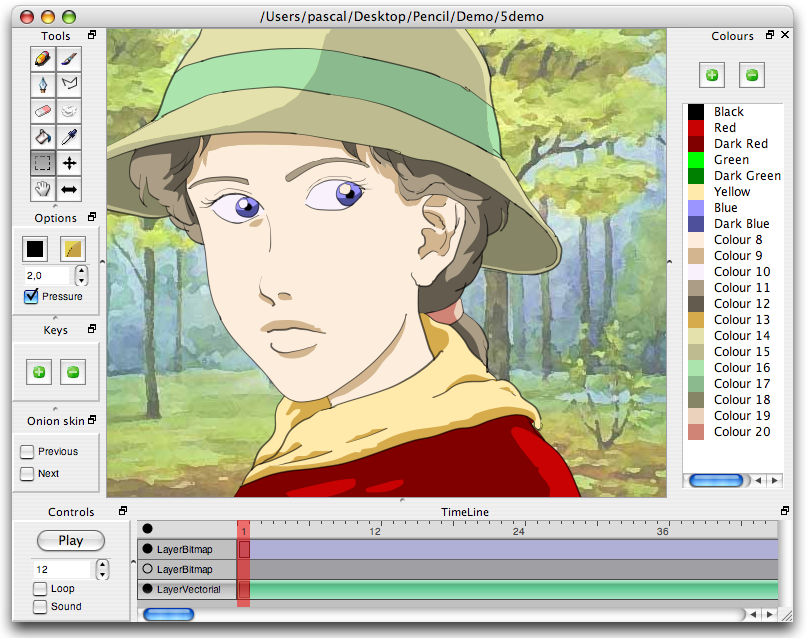 Pencil recreates the traditional style of animating on your computer. And it does so in the grand open source way!
If you haven’t heard of Pencil you’ve been missing out. This software is great if you want to rough out an animation before creating it in 3D. Or if you just want to animate in 2D period. Its really a nice simple program that works as stated.
The developers say this of Pencil:
Pencil is an animation/drawing software for Mac OS X and Windows. It lets you create traditional hand-drawn animation (cartoon) using both bitmap and vector graphics. Pencil is free and open source.
Pencil is not intended to mimick web-oriented vector-based animation software such as Flash. Its main purpose is to make traditional animation. Neither does it try to rival commercial software targetting the professional animation sector. Pencil is intended to be a simple program enabling anyone to make 2D animation.
Give the program a try. Its fun just to animate a ball bouncing or a line dancing around.
The Pencil website is located here.
Download Pencil here.
The user manual is located here.

Nice. Another REALLY pro software (not open source) is the Danish “PAP”, aka “Plastic animation paper”. I think that is what pixar uses :)
Hmm… it’s written in Qt, but there’s no Linux version? How odd.
I’d take a shot at compiling it myself, or running it under Wine, but I’m really not very good with real pencils, so I doubt this app would change anything.
@Lasphere: yeah I’ve used PAP. its great. I like the layered system you can use to separate inbetweens, etc.
I’ve tried getting it to work under linux before, only had limited success so here’s from an old email:
It compiles from Mac source after adding -lungif to the Makefile, commenting out Object::exportMovie from exportMov in editor.cpp and replacing libming.a with my distro’s own version.
Now running it there are a few problems, the performance is a tad slow (although acceptable if you turn off the anti-aliasing), the pressure sensitivity doesn’t work and onion skinning doesn’t affect the opacity of the previous or next frame making it impossible for me to see the changes i’ve made in comparison to the previous layer.
I may want to check this out. ^_^
Another open-source 2D animation program that I’ve heard of is Synfig.
Site: http://www.synfig.com/
I’ve used it, and it’s ok, depending on what you want to do with it. It’s great for learning or just trying stuff out, but it certainly isn’t what I would consider production quality software. Two major complaints I have (other than not running in linux) are a problem with the vector tool (it always moves my curves into the corner of the paper after I draw them, maybe I’m just not using it properly) an heavy memory usage (or maybe a leak)
I’ve tried PAP as well, but I find it a lot more complicated to use. (pencil is nice and straight forward.) I also don’t know the limitations of the free/trial version yet.
Two other packages to look at would be synfig (open source, more capable than pencil, more complicated) and Toon Boom, (high-end, industry standard commercial software. Expensive.)
-toon boom’s free, I think..
It’s not free, but the Express version has a 30 day trial
@Penndragon
“Another open-source 2D animation program that I’ve heard of is Synfig.”
I’ve just installed it on my ubuntu-box and within 10min it crashed on me 3 times!!! Also it seems to miss a freehand drawing tool, something one should think was rather important for making real animations. Im sorry, but to me it looks like crap. Feel free to prove me wrong though…
You can do vector layers — but I think the cool thing about this is that you can also create bit-map (no vector) images. It definately has issues. For instance, the wacom tablet support on windows is a little buggy, and it does seem to crash. Inserting in-betweens could be more simple. There is a “+” button that inserts a new frame — but it always puts it at the first empty slot. So, inserting an inbetween requires me to select each frame after, slide it over (to make an empty slot), then click the “+”.
What I like about it, is that it supports sound and that I can click the right/left arrows on my keypad to move back and forth between frames while I’m drawing, to simulate “rolling” the animation.
I’ve been considering using it as a tool for pencil-shooting an animation before actually going through the effort of doing it in 3d.
@mpl: “I’ve heard of [Synfig]”, not necessarily used it (nor do I use Ubuntu) so I can’t personally support or refute your claim at this time. Nevertheless, it seems to have worked for Methinks… Either way, I’m not Tech Support.
I’ve compiled Pencil on Linux/Ubuntu without any problem. I installed the libqt4-dev, libming-dev
and libpng12-dev Packages. Then I just typed “qmake-qt4” and “make”.
@Tobias:
A .deb package would be appreciated :D
I think that if you had that success, you should consider to offer the precompiled .deb package to the creators of Pencil, to make it available via their website.
Liinux users would welcome that.
Trying what Tobias wrote, received a
“… Error: /lib/libming.a – Archive has no index; run ranlib …”
sudo ranlib /usr/lib/libming.a (I figure this would be running ranlib) doesn’t fix it. :(
boohoo.. no linux version yet, oh well.. :(
if it wasn’t meant to compete with commecial products then IMO, it’s useless to learn this software.
You’ll never get far of creating quick professional work. But if you must waste your time then try it.
FOSS is not about being just a 2nd rate software. Had that also been the case of Blender, then I wouldn’t have ordered the Official Blender Guide Book. I do know blender is always ready to compete — it has its own strength, as well as, weakness. But, it was never meant to be just your 2nd rate software.
This looks interesting. Rumor has it that Ktoon is also coming out with a new release soon.
http://ktoon.toonka.com/
Interesting. Crashed three times for me on XP, so I’ll be looking forward to future, more stable releases, but it looks like it could be good. It’ll at least keep me somewhat happy until I can afford to buy Flash.
Crashes all the time, WinXP;
Nice program anyway
Just been using Pencil at work. I managed to get an animation with going in seconds, without reading the manual. Seems very easy to use. \^_^/
Hope a Linux version pops up soon. If it does i will request it in the next ubuntu studio distro.
Peace
Nice Software. Got it run under SUSE with newest WINE 0.9.38.
@Tobias: How do you compiled it under Ubuntu? I’ve got Feisty, installed the libs, but compiling won’t work, either with Mac-source oder Windows-source. Some hints?
@ Ravetracer
Theres an idea rather than wait for the Linux version. Run it under WINE for the time being ;)
Thanks :)
Hi!
I have tried Pencil Under Windows XP Home Edition SP1 and got a crash at opening, every time. I tried on two other machines with Windows XP Home Edition SP2, and it worked fine, even with the pen tablet (no pressure though).
This said, it is an interesting software, but for my own, I thing that its main interest is not for drawing cartoons !
I explain : As it alows to create bitmap layers as well as vector layers, it can be used as a rotoscoping and garbage painting software, to create alpha masks !
The main lack, in my opinion, is the lack of the ability of loading images sequences. Currently, if you want to rotoscope a sequence of images, you have to load each image frame by frame, and it is very long and tedious.
With a bit of luck, this feature could be added and the software improved in the direction of a rotoscoping tool.
It would be great for compositing !
Is a cool begining i think, i like the program is simple, maybe time bring more new features and bugs fixed.
I’ve been hunting for something like this for a long long long long long long long long long long long long long long long long long long long long long long time. Thankyou very very very very much. Thankyou. Thankyou Thankyou. Wow.
Me too!! I have used the animation tool at Benettonplay.com and was looking for something similar: Just plain good old animation style, to practice my skills.
It’s a bit rough in the edges yet, but it works -at least in my mac- and delivers. I’ll keep track of future developings.
What do you guys think of CreaToon. Anyone tried it ?
http://www.creatoon.com
You can load a sequence of images.
The whole thing is done in XML, so you and fix it up very easily in a text editor — or even automate the whole thing through a spreadsheet or database or whatever you use —
Here’s how:
a text document with the name you want to use for the project
and a folder named “.data
for example, “myproject” and “myproject.data”
in the text file you just type the following:
where the is a list of all the files
and then put those images inside the folder.
Once it’s loaded, you can use the grabber tool to center the the images in the frame (if you need to).
It looks like the forum took out my xml … let me try again:
!DOCTYPE MyObject>
MyOject>
layer visibility=”1″ type=”1″ name=”LayerBitmap” >
image frame=”1″ src=”000.001.png” />
image frame=”2″ src=”000.002.png” />
image frame=”3″ src=”000.003.png” />
/layer>
/MyOject>
note: I took out the ‘
@Paul
Thanks, but I meant load automatically a sequence of image, selecting all the wanted images in the browser, or selecting only the first one (image_0000.BMP) and leaving the software select the following frames (image_0001.BMP, image_0002.BMP…)
Creating manually a list of images is as long as loading the images one by one…
Since you are mentioning commercial softares also- have a look at Anime Studio.
It is pretty powerful, not too expensive, and easy to learn.
It can be used for vector or traditional animation. The drawing tools are a little strange and not perfect, but easy to get used to.
If you are looking for inexpensive 2d animation app that can produce pro looking output, have a look at Anime Studio. The name is dumb, but the program is good.
I have used it a few years.
Just a word about synfig, it is still very much alpha software and thus needs a lot of work, last i looked the windows builds were the most stable.
And my thanks to Blendernation for not only doing a great job in keeping us informed on Blender and also telling us about other software packages that we blenderheads may be interested as well.
i love 2d animation
I kinda like this program. It reminds me of FlipBook by DigiCel.
I could got it working on kubuntu as Tobias said. After installing the libraries, download the source code, extract it, navigate to the directory and simply type qmake-qt4 && make
You have to have g++ installed. If it isn’t, then install it by sudo apt-get install g++.
Just wanted to add that Pencil has official build for Oubuntu and ArchLinux
http://www.les-stooges.org/pascal/pencil/index.php?id=Download
“Tobias Edit Link Jun 3rd, 2007 at 9:40 pm
I’ve compiled Pencil on Linux/Ubuntu without any problem. I installed the libqt4-dev, libming-dev
and libpng12-dev Packages. Then I just typed “qmake-qt4” and “make”.”
I’ve done all that and got “bash: qmake-qt4: command not found”
also tried downloading from this page at “Package for Linux Ubuntu” and got stuck in the package installer with “Error: Dependency is not satisfiable: libc6”
It’s a great piece of 2D animation software. Thanks!
f
The builds for Ubuntu and Archlinux are available for download on the Pencil website.. YaY!
Very sub-par. The drawing tools are lacking – The fill bucket tool has a hard time doing its
job and your lines get messed up after finishing a drawing stroke. Yes, it is free but why go through the hassle?
the program looks really fine and it seems to do great things but every time i try to do something it crashes, and it’s driving me crazy.
http://www.3dmagix.com/orderstep2.htm
he sel the software and change the name dont respect the licence .. i mail to
http://www.pencil-animation.org/index.php
++
So this program is open-source and free, huh? Then why do I have to buy WinZip in order to actually download it? If i’m missing something, i’d lovve to know what it is. (I run on Vista, btw)
http://www.7zip.org is all you need to open ZIP files…. though I agree that .7z files are far far superior
(it is open source)
I downloaded Pencil and tried unsuccessfully to use it. Makes sense why it’s free, it is full of bugs and glitches. Basically it was a waste of time I’ll never get back. Too bad it sucks! I’m using a Mac quad core and Pencil will run but it has some effed up drawing glitches.
Pencil is now stable and works a treat on Linux. Amazing, they could have decided to sell it for a few bucks. But instead it’s free and open source. Brilliant.
For those who want to compile pencil from source. These are the packages needed. Done on Ubuntu 10.4 lucid with qt 4.6.
libqt4-dev libming-dev libpng12-dev libqt4-phonon-dev and any additional dependencies that you’ll get prompted for.
great stuff. Send me a link to download please
I’d love to try it but couldn’t find anywhere on the page to download it. I was wondering if this would work with my background art, could I load it into the program? Do I need a scanner or can I use my digitial camera?
I’d love to try it but couldn’t find anywhere on the page to download it. I was wondering if this would work with my background art, could I load it into the program? Do I need a scanner or can I use my digitial camera
>>CORRECTION “Pencil is an animation/drawing software for Mac OS X and Windows.” and Linux .
Linux, Mac , and Windows …
i tried it somehow when i draw it looks super pixilated