

Precision modeling a 608 Bearing.

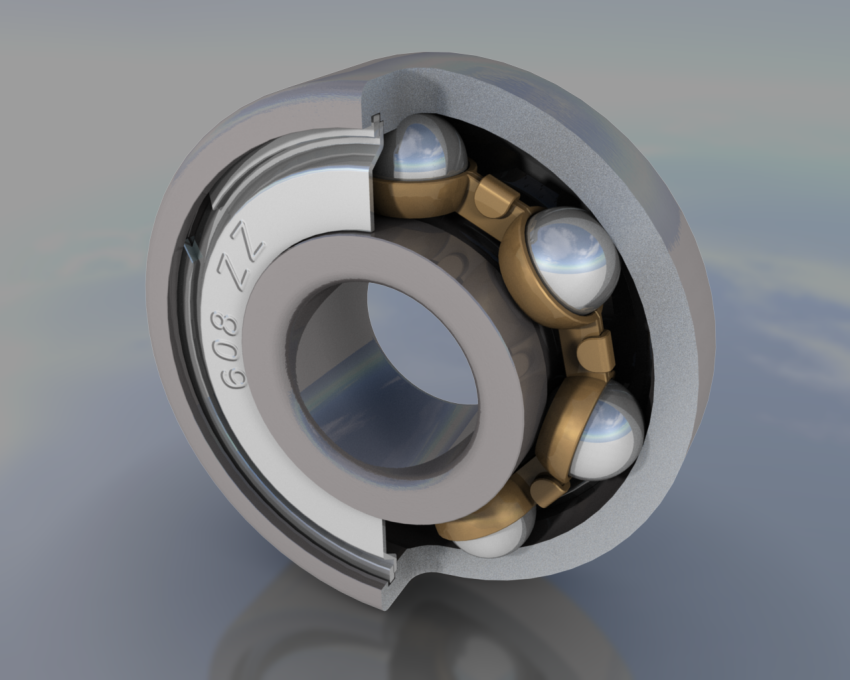 Robert Burke has created a modeling tutorial with a focus on precision modeling. It is an excellent and very detailed tutorial. Some great techniques and clear detailed instructions.
Robert says the following of the tutorial:
It covers many of the modelling techniques needed to produce accurate designs in Blender and may be a useful reference for anyone keen to produce accurate detailed models.
The tutorial can be found here.
Robert Burke has a thread he started at BlenderArtists with an image that he created using the techniques demonstrated in the tutorial. It can be found here. And the tutorial announcement thread is located here.



Thanks, I may need this with my Dalek project: http://blenderartists.org/forum/showthread.php?t=96922
Hm… Tried to log in to edit my post so it wouldn’t have the tags, but it says I have insufficient permissions… However, I know I logged in correctly.
Sorry for the double post, but:
http://blenderartists.org/forum/showthread.php?t=96922
Fixed.
awesome! best tutorial ever. hard, but is hard for a reason.
Very nice! I used to be into the whole engineering side of 3D, that is until our awesome Drafting teacher got replaced by some schmuck. I still have interests in it though. I used blender in class more that I did Autocad
Good Tutorial! great job
One word… Great!!! :)
Nice tutorial, might become useful course Im “trying” to make a female android and need some mechanical stuff there.
super tutorial! would be worthy of inclusion in the latest manual
It’s a really nice tutorial…
Learned some really interesting stuffs.
I am impressed by the methodology and precision of the object :)
Could it be used in rapid prototyping? Don’t know if you tried that :)
You have produced a very well constructed, well presented tutorial, which will with out doubt be one of the best precision modeling tuts I have seen for blender. And you have only been doing 3d for 2 years? Is that right? That’s what I gathered from your web gallery. Well Great work and great tut. Thank you!
I have not come across such a details tutorial using BLENDER. Robert’s time and brain is the most valuable brain-share that I have ever seen in Blender community todate.
Thanks for sharing your knowledge.
You did such an amazing and detailed job, loved every bit of it, here’s what I got: http://youtube.com/watch?v=k8SHKy5tXbI
@ John: thats great. thanks for sharing.
Cool point of view. Using blender in engineering work. I’ve had a brief look at it, when I get better time I will study it more to pick up a few new tricks.
BTW did you know that you kan move your 3D cursor arond from the View->View Properties menu (when you are in editmode). This way you might not need to extrude some measurements, and move your cursor.
Keep up writing tutorials!!
Looking through the first part of this tutorial, this is how I model most of the stuff at work here.
With a certain exception though. When he rotates certain vertices in the circle to be close to the edge, and then scale them to 0 to fit the edge using 3d cursor pivot, I would use the GEOM script to find the intersection point between those two (actually 6 in total) edges. I think that’s a tad more precise?
He’s got a pretty good site, and this tutorial is really clear. Nice addition…
OMG, it is one of the best tutorials that I’ve saw !
Brilliant, Brilliant !! Nice design for the web site too.
Wow!!! Thanks for all your comments; I am overwhelmed by all the positive comments I have received.
Grafixsuz
I only found blender around 2 years ago. I have been using Solidworks since 2002, which helped.
freakydude
You are right that is a bit of a hack. I haden’t stumbled across the knife/vertex snap until I was looking for ways to accurately cut the cage (after Part 2 was finished). I might re write that bit and just cut new vertices on the circle from the horizontal lines.
Thanks again
Rob
Well it is a really cool tutorial, I really like to see how blender is used in an engineering environment, since that happens to be my new job. I don’t engineer, but I recreate loads of stuff in blender for marketing renders. Mostly pipeworks. but this tut shows quite a lot of cool stuff.
Might I add, i think with the knife and snap combo, you still have some, a very very slight inaccuracy. if you look for the geom script, with it you can intersect all kinds of edge/face combinations etc. It wouldn’t be a 100% accurate in this case either since a circle is only as much a circle as the amount of segments it has. But it saves me a lot of time every now and then.
I was looking at your render again, and I noticed something. I don’t think it is described in your tutorial, how did you cut out half of the “rings/cases” and give them a round fallof where they intersect/make a 90degree angle?
Manually cut temporary faces? Boolean? or hack?
The radius on the part section was spun off the bottom face, extruded through the bearing and manually cut at the other intersects, knife/snap. I first rotated the bearing 1/2 a facet.
I haven’t tried the Geom script yet. It sounds useful, I will look it up.
hey robbur, in you are reading this, your tutorial seems to be offline, is this temporary or have you removed it? Just wondering, I was gonna go through it again for a technique I might use at work here. So I was kinda wondering where it went?
nevermind found it, wrong link