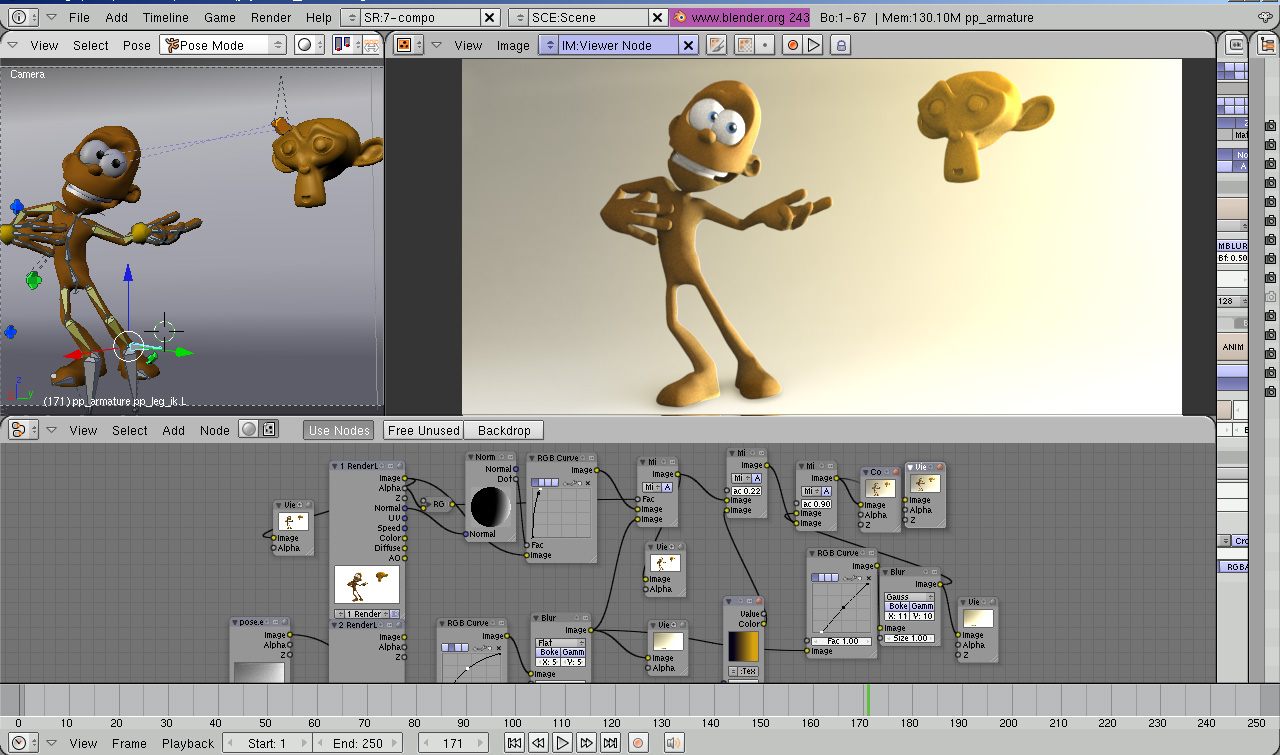
 Well-known animator Daniel Martinez Lara from Pepeland.com has started experimenting with Blender, and he has already posted a way cool video-tutorial on using normal nodes in the compositor to achieve real-time lighting (the tutorial is meant to play without sound, in case you're wondering).
We were all excited to be contacted by Daniel and he was kind enough to answer a few of our burning questions about his work and how it involves Blender.
I guess we've all seen some of your animations on the web. How did you get into animation?
15 years ago, making the animated credits with a 2D program (autodesk animator) for a live action short that I made, I remember that I said to my self "Hey, that's cool, I prefer to work with computers" :).
Can you tell us anything about your current work?
Now I´m focused on my animation school, but my mind is working in the background on my next animation short. Before that I´ll make a couple of test animations just for fun.
How do you use Blender? Is it part of your workflow?
At the moment I´m only playing and testing the program and I'm very happy with the results :) I'm sure that Blender will become another "standard" in the 3D industry soon and I wanna participate in and support this process. My next step is to make a tiny animation with blender and test the animation tools. It would be nice make my next animation short with blender, in fact I´m sure that my last animation short "Changes" could have been made in Blender without problems.
What's the biggest issue with Blender that might keep you from using it more often?
In my case I would like see more animation tools in general, for example a "custom attributes" modifier to collect the important animation channels in one object, ik/fk, strechy values etc. and remap keyboard feature :)
Are you planning to make any more of these cool tutorials? :)
Sure! Maybe something about character rigging or animation techniques, stay tuned :)
Be sure to check out Daniel's animation and stills galleries on his site. I did find that the connection to his webserver can sometimes be slow or unstable, but keep trying - it's worth your while!

30 Comments
Wow!, holy $#!+!!!!
real PEPELAND. very good ... very good. 0_0
Really GOOD, this is great !!! I could not imagine we could illumate a scene like that ... This gives to me a brand new way for my post-prods.
WOW :)
.::PiPi::.
That's great I had no idea you could do that in blender, thanks for the link and for Daniel for the tutorial.
and to, sorry bout typos. early morning
man thank you so much. I have been waiting to try this out ever since I saw the pixar guys doing it on a cars render :)
Wow.. nice technique and certainly something really cool to try out.
Can I just point out that this is a great article for B.N.
Asking a talented and experienced member of the CG community some straight questions.
Very cool technique! Thanks for the tutorial!
wow thats really great, theres always something new to learn with blender
This is realy briliant news. Such an experienced and skilledand quite famous animator will be realy valid mamber of Blender community. Excelent!!!
I am mainly looking forward his tutorials on rigging with his baground in commertial 3d apps.
Clever techinique! Thank you, Daniel!
Magnificent. Thank you Daniel for showing us this neat trick.
I am not so familiar with composite nodes yet, but can someone tell me if this can be automated to a series of images? Also, can you animate those normal spheres with IPO - curves or something?
Anyway, way cool technique even without these. And warm welcome to Blender community, Daniel Martinez Lara!
ah man, thanks Daniel! great tutorial!
I got the tip-off that something like this would be possible after watching that video example on blender.org with the tree and the hand... it seems to have disapeared(?) Anyway, I didn't think about it enough to come up with something so brilliant myself, but thankyou Daniel for coming up with the idea for us all. Compositing nodes really save the day in time-saving.
I noticed in the example nodes tree that there are some EXR images being used. Does Blender actually use lamps to generate 64-bit images? By that I mean, is using an EXR as aposed to a PNG necessary? I'm very interested in making EXR/HDRI with Blender... Anyone know anything about that stuff?
Now your talking - Character rigging or animation techniques - that would be brilliant. I really want to learn that aspect of Blender.
Nice article.
Cheers
I can't move the backdrop image. Which keys needed?
Thanx Daniel,
very cool and so simple (when you know how it's done of course!)
@ steve: It's shift + MMB :-)
thx fritzman!
and thx Daniel for this great tutorial!
How brilliant, and that from someone who just got into Blender, I suppose? Maybe that same technique is available in other packages, that's why he could nailed it down like that. It looks GI like. And not to mention how much personality emanates from that simple character just by posing it. He's opinion about Blender is soooo flattering that it makes the whole community proud that Blender is on the right track. Have you seen http://www.keithlango.com yet? Another professional animator that know about the existence of Blender has posted a cool link about puppetery in Blender.
Of course Daniel is 'just' scoping out Blender, but it would be very cool if more professionals start using Blender.
Daniel Martinez Lara making stuff in Blender... interesting situation :). Regards !
Daniel Martinez Lara got some real knowledge, probabily with any kind of tool, blender, 3dsmax, xsi, lightwave...whatever... Really nice work - he's the man! Excelent animations! Loved "Changes", beautiful!!
I've just seen changes and I must say that me love the character animation long time, and story too.
But I detected a familiar shot though... from For the Birds. When all those characters were in line (basicaly showing only the front character) and then all the other characters fan out from behind him, that shot was literary taken from For the Birds
toontje: the technique is actually really basic computer graphics theory, but applied to blenders nodes.
You can also create speculars with this technique, by adding a ColorRamp between the Normal Dot output and RGB Curve Fac input
There are a lot of disciplines in computer graphics. But this post pro is not your standard 3 point lighting to state it crudely.
O M G !!! i think i dont want to wake up from this nice of a tream.. i remember seeing some of this guys animations(at least one for sure :/) featured on the front page of cgtalk.. O_O sweeeeet!
very good job!
gratulations!
Rather late, but I would like to say how useful this method is! Simply sensational!
I WANT INFORMATION ABOUT REQUIRMENT OF 2D ANIMATOR