

Using Blender’s Game Engine for More Than Just Games (updated)

 Sure, Blender has a built-in Game Engine but, don’t let its primary functionality box you into just thinking about games. Think outside of the box, and you’ll find that it’s very useful for many different things. Mike Pan (aka mpan3) has done just that.
Mike has created several well-executed examples of how to use Blender’s Game Engine in ways that will surely spark some ideas of your own. His examples range from a simple interactive 3D Earth-viewer that features high-resolution textures and moving clouds, to an interactive 3D Gallery that can load any image and display it on the canvas.
The best part is that these examples are .blend files so, you get to pick them apart to see how they were created!
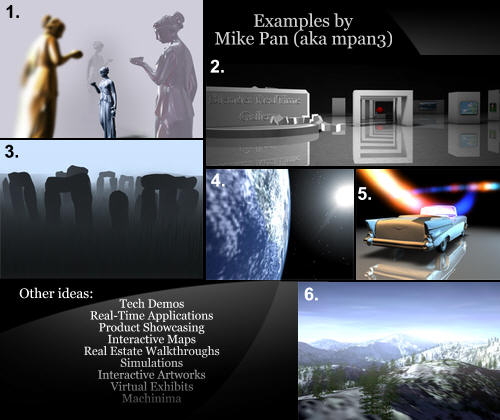
1.) High Polygon-count models with different materials applied. (Marble, Pearl, Gold, Blue metal…) This is a demonstration of what you can do with just two layer of static texture and vertex lighting. (translation: even a graphic card such as the Geforce2/Radeon 7500 is capable of nice surface shading)
Techniques: High polygon models(source unknown, found in public domain), simple UV texture, reflective UV texture, vertex lighting, fake highlights with reflective UV textures.
Download the packed .blend file.
2.) An Interactive 3D Gallery that can load any image and display it on the canvas. The lighting condition and the layout can be also customized. This demo runs on most PCs. Requires Blender 2.40.
Download the .blend file (8 MB)
3.) Stonehenge in the fog. A very moody scene with a high polygon count and minimal texture.
Techniques: Ground fog, add particles to scene, rotate camera around a fixed point.
Download the packed .blend file.
4.) A simple interactive 3D earth viewer that features a high-resolution textures and moving clouds. Requires a modern graphi card to see the high-resolution textures. Texture courtesy of NASA. Requires Blender 2.40.
5.) Originally part of a benchmark suite, this tech demo features fake reflection, dynamic lights and reflective textures. Runs on most PCs. (car model source unknown, found in public domain). Requires Blender 2.40.
6.) A demostration on how to achieve hardware rendering (rendering on GPU) using Blender’s internal game engine. A 20-second clip renders in a mere minute. A significant improvement over the traditional off-line rendering where a frame usually takes minutes, if not hours.
Techniques: render movie in realtime, capture screen using python, sky dome, using pre-defined ipo to drive animaitons, fog, alpha textured vegetations.
Important Note: Be sure to read the text in the Text Editor window for any available instructions.
Also, be sure to check out the other interesting things on Mike’s website.
 In what other creative ways can Blender’s Game Engine be used?



Wow! I never knew blender could do that. Nice Work.
OMFG!
I love the fact that blenders game engien is actually quite powerful.
Here’s an idea. Make some sort of animation, like a waterfall, then make all the textures animatable or something, then put them into the game engine. You now have something that will look like a real waterfall, with all the moving parts and stuff.
See his animation of an landscape ( ..last video in the ani section )
Incredible – Amazing…….. =0
that’s all very nice, but the problem as always is the performance.. The idea of the gallery is very good, but i think the “box-fall” (that logo thingie) is really not helping the performance. After 5 Seconds of navigating through the gallery, the process starts using 110% of cpu-performance..
Mike’s website apparently got blendered, so i can’t reach him, but if he’s reading here, i would like to see that same gallery but without that logo, if it’s possible… (every computer has it’s limits)
@Omar:
I agree about the performance of the “art gallery”. I’ll try to contact the author and see if he has a .blend file for that one that he wouldn’t mind sharing, as well.
this definiately needs to go in the wiki/ Game Engine section, as practical ways to USE Blender. thx
ahh too bad the gallery is a windows executable… seems like a nice job. Congratulations !
Mike’s stuff (and elephants dream) are what got me into blender in the first place. good job on getting blendernationed mike, keep it up. people should really check out his bullet hitting a drop of blood. it’s awesome
90000 polys @ minimal of 20 fps tha’ts not bad – is Ogre really more powerful than that?
Very neat! The gallery one is of great interest to me and the realtime rendering can be very useful for something I have in mind!
Great stuff and ideas! Downloading ;)
Funny!
You can also use the game engine for rigidbody baking.
In Blender 2.43 this can be done without python scripting. There is also compound support, and rigidbody_constraint editing:
http://www.continuousphysics.com/Bullet/phpBB2/viewtopic.php?t=752
Erwin
eh,, it’s neat but reallllly needs the Orge intergrated. Cause thusfar you cant get fine grade pixel shaders and control over things like GL passes and Multisampling, without multisampling it cant be used for a render replacement yet…Â
But great starts! …
It’s funny how easily the average blender.org visitor can be switched into “OMFG” mode. And sad at once ;)
tripdragon: Ever looked into your graphics card’s “Settings” dialog? No? Look for “FSAA”.
I was able to contact Mike concerning the 3D Art Gallery file. He was kind enough to dig up the old (2.40) .blend file used to create it! The download link has been added to the article. There are some issues with the file, however. In his words:
QUOTE:
—————————————————————————————————-
You are right the slow performance of the gallery runtime is mainly caused
by the falling cubes and the reflection on the floor. The reason I didn’t
provide the .blend file is because the scene was made a while ago in 2.40
with sumo and the old graphics engine in mind. I’ll have to implement a new
mouse-look script and disable ‘use blender material’ for it to look
correctly in 2.42.
… the only problem it has is the mouse script. Sorry I didn’t have the time to fix it right now…
—————————————————————————————————-
I’m sure those interested will find a solution! Enjoy.
the gallery blender file is uploaded, see the article above. The only thing is that the mouse script has compatibility issues with Blender 2.42. So either use an older version of Blender or have fun fixing the viewer yourself :D And like most of you, I can’t wait until OGRE integration…
I love the Blender game engine. For those in NSW, Australia, You’ll know of the HSC for high school students. For my HSC body of art (in visual arts), I submitted an interactive 3D artwork using Blender (much like his walk though gallery, but more focused on it being an installation. I was going to send it in to the guys at BlenderNation but was going to wait till I heard back from them. It has currently being held back for consideration into Art Express, which means it has got at least 90% and may or may not be going to be displayed in an art gallery or among other HSC artworks in a touring display or something. I’ll e-mail when I hear, but it’s related to this post so I thought I might as well comment it as it’s not technically a game, but I’ve used the Blender game engine to create a fun little game :)
The gallery works fine if you switch the physics engine to sumo. It may be deprecated, but it works.
Found the same for some architecture walkthrough I’m working on at the moment. The bullet engine made the camera tumble around without any key (as defined in the logic “bricks” to move it) pressed. Had to switch back to the “sumo” engine.
“bullet” may be superior, but it IMHO needs some fine tuning.
Rendering on GPU.
It’s the best ideia than I see.
Thank You.
Suggestion for the landscape flyover (6): Make each tree a seperate object, and set its “Billboard” flag. More realistic trees ;)
Thanks alot for sharing that, Mike !
Very interesting things. The real time GPU rendering is really amazing !
For my own, I’m a bit clumsy with the Game Engine, but I use it for simulation of rigid body interactions with low poly meshes, and I apply the baked Ipos to the high poly models.
I’m currently working on sequence with a police chase and cars stunts using the Game Engine for the stunts. Flying garbage cans hit by the cars are much more realistic using the rigid body simulation than animating them by hand !
As The game engine needs everything to be UV mapped, I’m not sure that I could use real time GPU rendering, but I’d like to ! Also, I have a very high number of polys, but I’m sure I’ll use it for some works !
I am happy to see this article. Last year I created a classroom tool in Blender’s game engine. Basically showed each orbital (s,p,d,f) and you could toggle each orbital on/off. Really simple.
Can’t wait to try the demos when I get back to my computer. Looks very exciting. Thank you mpan3 :)
Quick noobie question (not “up” on all the blender news): What’s OGER? And what will it do if it’s integrated with blender?
@U OGRE is a more powerful graphic engine, with pixel shading and stuff, in other words it makes your games look better.
tripdragon: Ever looked into your graphics card’s “Settings†dialog? No? Look for “FSAAâ€.
Silly macs dont have any GPU settings
Rendering on GPU as in sending the instructions and having, it procces the render like a cpu iwstead would be even better but a bit slower, But someone has to do it ,,,, or not.
And the deal with such a wide array of cards…
Looks good. I am downloading
tripdragon: Tried setting __GL_FSAA_MODE ?
tripdragon: Tried setting __GL_FSAA_MODE ? Â Â
eh have no idea how to set it. I am sure it’s a env somewhere in a dot file but atm it escapes me
To answer the question abut other uses for the game engine, I reckon it could be used for real time TV graphics, much like the over-priced (and poorly programmed) viz|rt.
viz is used to make graphics for everything from weather forecasts to sport telecasts, elections, basically anywhere you need data driven graphics rendered in real time.
All it would need is improved text handling, (i.e. with the ability to render text dynamically) and the ability to output a key signal (is that already there?).
If there was an open source 3D app of blender’s quality and power available for this sort of work, it would change the whole TV graphics industry!
Wish I was a programmer so I could help…
These run terribly slow on my machine. about 3-5 frames per second. It goes up to 7 after building them.
My specs: windows xp, amd athlon64 3500+ (2,2 ghz), 3gb ram, geoforce 7900gtx
I’m new to Blender. Just installed 2.42a and tried these demos. Should they be so slow on my system?
timshark, something is horribly wrong with your system. assuming you are talking about the gallery runtime, i get 20-30fps on a AthlonXP 2.4Ghz, 1.5GB RAM and a 6200. Did you installed the chipset and graphics driver?
tripdragon, you can also just render everything at 2x the resolution and then sample it down while compositing. This actually gives much better image quality than multi-sampling anti-aliasing. Of course all of us can’t wait for OGRE.
Hey is it not possible to get a camera to track an object in the ge? I’m trying to mimic number 6 with a simple cube and camera movment. I’ve tracked the camera to the cube but when I start the ge all I get is this crazy cube moving everywhere!
mpan3 wrote;
“timshark, something is horribly wrong with your system. assuming you are talking about the gallery runtime, i get 20-30fps on a AthlonXP 2.4Ghz, 1.5GB RAM and a 6200. Did you installed the chipset and graphics driver?”
Thank you for the confirmation, mpan3. It seems that after i pushed the relative paths in the file menu in blender. The demos works fine. I don’t know what I did….really like to know :-) Sometimes they are slow again. I start up, then they are fast again….???
My system is in top shape on everything else.
U238, it is possible, but you’ll need to use the blender ‘track to’ logic brick (found under objects) to achieve this, normal ‘Ctrl+T’ won’t work. But as blendernation is not a support forum, I don’t want to go into too much detail. If you need help, just stop by at blenderartists.org/forum
These demos are great. Thanks.
I really like the gpu rendering demo.
The workflow would be:
1) build scene in blender
2) texture scene
3) run the (new) texture baker to save nice lightsetup (not needed with OGRE ?!?)
4) animate camera
5) start game engine and wait until everything is saved.
freen: Of course, the Game Engine can render dynamic text. It’s not documented very well though (as most of the Game Engine ;) – maybe Google for “Bitmap text Blender” or something…
you could try with a python script – afaik you can access text objects from python though I’m not 100% sure whether you can actually get the object with the GameLogic module – I think if the scriptlink is attached to the object that actually contains the text, you should be able to change it on the fly by using GameLogic.getSensor().getObject() or something similar but I can’t remember the actual line – do print(dir(GameLogic)) or print(dir(GameLogic.getSensor())) in a script attached to a game object and check the console window after you’ve run the game to find out. Don’t try too much dynamic stuff in the game engine though – I once tried to load a file from inside a game which was set to automatically run the game that it contained and then load the original file again etc… like a sort of demo loop – It should have worked fine, but when I ran it, Blender segfaulted at random (not always, sometimes just screwed up the objects instead) everytime any of the files were loaded from the script; although when I turned the automatic running of the game off in the file to be loaded, it loaded fine – I put it on the bugtracker and ton just said that it was my fault for abusing the game-engine (it was a bit of a hack – involving a GameLogic module that was still imported even after the game had ended – linking to memory that had already been freed) but in my opinion, a program should never segfault from anything the user does however hackish it may be – shouldn’t be possible to do, it should have a safety feature coded in to Blender to prevent it (especially if it’s a known problem); I tried to fix it myself but the code behind it is beyond me (part of the code that links C objects to python since blenders native language is C) – there are lots of other ways to get blender to segfault too – it’s quite fun finding them!!! just terribly irritating when all your work gets lost… ;) -epat.
p.s. actually, the above bug could be quite serious and could probably be used as a security vulnerability if I knew what I was doing since it allows python to access memory that is being used by other processes or has been freed for use elsewhere – these processes could potentially be parts of the operating system – so it should definately be fixed!!!
sorry – I rambled on a bit there didn’t I *woops* lol ;) -epat.
OMFG indeed.
I wonder where this all leaves VRML / X3D / and network 3d ?
I’ve had an idea for ages to build a 3D net browser…maybe I can
stimulate interest in the Blender community to combine the game engine
with some kind of browser plugin and network code….?
DJBarney
Six+ months later…
and I show up! How cool is that? OK, so I am a noob, but I am curious, how does one convert the GE saved frames to a movie without running out of ram? (I have 512 and can’t upgrade just yet.)
I tried in another app and it took forever to load 30% of the 1400 frames so I canceled… then I tried Blenders sequencer, for the first time, and tried to load *all* the frames at once… wait for it… wait for it…. *BOOM*
I have dabbled with Blender’s Compositor, but now am fearful.
is there a trick to making a movie file from 1000’s of frames?
is there a way to chop it up into smaller batches and combine them together without losing quality?
other ideas or insights and/or links, highly helpful. Thanks in advance.
nevermind.
i was loading the pics as a “movie” not “images” in the Add menu.
thanks,
To *clearly* explain:
1- I am attempting Example #6
2- I was using the Sequencer.
3- Sequencer Panel -> Menu Bar -> Add -> Images (do NOT choose “Movie” when loading images)
My *latest* question(s) are:
how to rename the frames to pad them with leading 0’s (Zero’s)? I’ve found some programs online that do this, but I’m curious what others use.
also, if anybody is so inclined, how to correct the python code so it would do the padding for us?
Thanks.
Links aren’t working anymore…
The links have been updated. Thanks!
And here I show up, damn, thoose are some nice blends… *drewl*
Anyway, I just dont get it, here they have like 90k + polys and I try to make the most simple game of 1500 polys and the fps in my simple maze drops way way low, but in theese blends theres a good fps..
Scrathing my hair, well, anyway, theyre really really nice… specially the stonehedge one..
Hi everyone!
i’ve downloaded the car.blend (number 5 on the picture below) who make a fake reflexion but i can’t understand how it’s working!
there is what i’ve understand:
1) the reflexion is made with a map called ref.tga
2) it work with the UVtexture
3) i can’t find this map in the material!!!!!!
is anyone can help me?????
How to replace pictures in the gallery???
I am video editing professional , but few months ago i startet to intresting myself for blender, i like it very much, i think blender is better than 3d studio max!
OMG. BLENDER ROX!
has confusion between blender and 3dsmax.
but i think blender is waaaay much powerful than the latter.
Hey, I use Blender Game Engine for another purpose. Look at my multimedia show:
http://vimeo.com/35154176
http://vimeo.com/35507298
http://vimeo.com/35507875
And old one (sounds horrible).
http://www.youtube.com/watch?v=oC6XF3NS7ys