

Game: Br!x 2.0

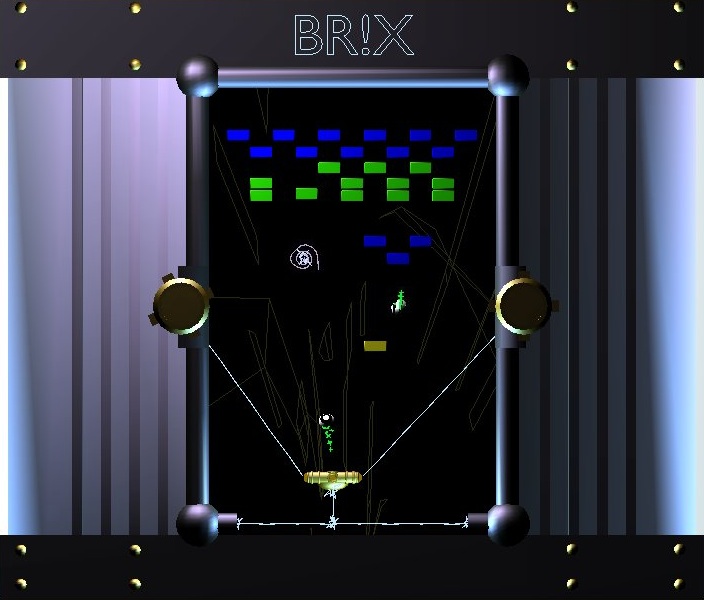 Jason Bonham [p00f] has created a Blender game that everyone on the BlenderArtists forums is raving about. It’s a combination of breakout and space invaders and contrary to most Blender game projects, this one is finished, highly playable and quite addictive.
Now, grab your copy (right-click, save-as), read the instructions below and enjoy!
Move paddle left and right:
- <== and ==>,
- Left and right mouse buttons.
- A-key and D-key
- Joystick left and right
Fire Missile:
- Space
- ^ Up
- Middle mouse/ mouse 3
- Joystick button1
Restart/Reset:
- R key


Is there an easy way to make such a game not depend on Blender?
Yeah, it would be sweet if the game was in a .exe format or something…
From the Game Engine FAQ:
“Can games be converted to an executable?
* Yes. First remember to pack your data (packs textures used into .blend). In Blender, select “File”, then “Pack Data”. To create an executable, select “File”, then “Save Dynamic Runtime”. In the newer versions of blender, the executables need sdl.dll and python_current python version here_.dll (ex: python24.dll), in order to run. “
Nice game!
BTW: It seems that things has changed in current cvs and playing this is quite surreal. Blocks are floating in the top of the screen and collision detecting is not working correctly and thus game never ends.
Though he should either have used textures instead of 3D objects, or used FSAA for the screenshots, as the aliasing looks horrible ;)
I like it! :-)
Good game.. it brings back good old memories of may atari console and the arcades :)
It is a really great game – highly addictive!
Saving it as a runtime makes it runs smoothly on my linux system – and the graphics are good enough even in a maximized window.
I don’t know whether it’s the same under Windows, but here there’s no “in-game” way to exit the game when running as a standalone program, means: “Esc” doesn’t work.
This can be fixed quite easily by selecting the object “player” and adding a sensor (Key Q), controller and actuator “Quit this game” in the Logic window.
And now I have to return to the game… ;)
Problable a very dumb question, how do i launch tha game?
@Bejellereven: Open the file with Blender, put the mouse cursor over the playing field and press “P”-key.
Hi!
Nice game ! I’m very new to the Game engine, and I have not been able to do good things… this game is impressive, and also it’s fun !
Well done ! Thank you for sharing !
Philippe.
awesome !!! i like it ! i wonder if he could make a tutorial for creating this game..
anyway,is there any link for blender game tutorial ??
Wow.. I didn’t realize that the new Blender game textures allowed for selective wireframe rendering. That is SO COOL and I’m going to exploit the mess out of that feature…. as soon as I finish this history paper. >_>
Sounds cool. I wish the link still worked
The link to the file doesn’t seem to work, does anyone have a copy or know where to get this ?