
Non-particle Candle Flame Resource.

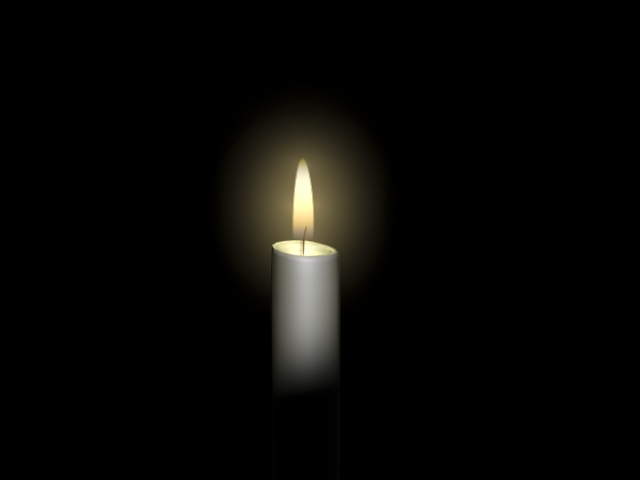 In case you missed this, Nathan Dunlap has created a nice example of a candle flame sans particles. A good example of simplifying a workflow to achieve an effect.
The animation looks very nice and very realistic. And to top it all off Nathan generously shares the .blend file with us as well.
Find the links below after some more info from Nathan:
In my latest animation, the two main characters are candles. Naturally I needed a very nice flame to go along with them. I tried particles, which looked okay when the candle was stationary, but as soon as the candle moved around too much, the particles trailed behind. In addition, the particles were slowing down Blender, slowing down the render, and sometimes Blender would crash when I rendered an image with the particles. So I scrapped them and went a different way. I made a candle flame out of a mesh. It looks better than the particles did, it is much easier to control than the particles, and it renders much faster than particles.
The candle is controlled by a very simple two-bone armature. It’s all procedural textures. Feel free to use the candle as it is or changed to suit your needs. But please credit me if you use it unchanged. Thanks.
An animation of the flame
(right click and save as please!)



I’ve had a look at the blend file and I find it very interesting
This looks heaps better than all the particle examples that I have seen. And it’s so simple! Just brilliant. Thanks very much for sharing!
Awsome. This reminds us of the fact that most games these days have awesome effects in realtime and the secret is to use textures. Particles have their place, but a good texture can make an amzing effect. Maybe blender should come with a few presets for faking fire.
oh, and I’m glad to see starry night as the header. (a little more long-term appropriate than) and the subtle reflection on the menu bar was a nice touch.
nice, but isn’t that flame casting a shadow?
edit the material of the candle wax so that it has a low reflection and a higher emit value for a awesomer look :)
The link to the website doesn’t work! :(
This is excellent; I’ve done fire with particles in the past and all the complicated multi-layer approaches never looked as good as this.
Thanks for sharing LGM!
Yep, looks much better than particles!
Reminds me of an old-old example blend file – I believe something like blacksmith.blend – with these two cartoon characters, and a nice flaming furnace, also with textures.
Very simple system, but an exelent result !!!
Thanks a lot for sharing that.
…. and yes, the link to his websit doesn´t work.
The greatest ideas are simple. Congrats!
Very well implemented!
Seems that not the link to nathan site is the problem :-(
It appears his website is currently down.
yep site is also down for me.
I’ve already used a softbody mesh for outstanding results, buffetting it between two empties generating wind.
Whoo nice one. Perhaps Soft Body dynamics will improve it even further :)
I’m glad you all liked it. The candle only casts a shadow in the animation, the blendfile was fixed as you can see in the still render.
Yeah, the server I use for my website had issues yesterday. It’s better now. Lucky the blendfile is on mudpuddle, eh?
Logan: I tried softbodies originally, but I didn’t like the the way it looked. When I used an armature, I could completely control the way the flame moved, something that was important for my animation. But if you’ve got a million candles all going at once (say in a castle, or something) then softbodies might be more reasonable. But again on the same token, you could animate a loop and offset each candle. Anyways, the point is that I already thought of softbodies, but couldn’t get them to work for me, and that’s why it’s an armature.
Nathan
The flame gets even better if you put it in a separate render layer and then use compositing nodes to blur it a bit.
Your nice blog is normally worth a read if anyone results in it. Im lucky used to do because now Ive got a completely new view of this unique. I didnt realise that the issue was so important and thus universal. You definitely indicated in perspective for everybody, thanks for the fantatic data.