
Interview with Colin Levy

 *After the great interview of @ndy, Mark continues on through his list of interviewees at Siggraph 2006.
During Siggraph 2006, I had the opportunity meet and interview Colin Levy (effstops) who was there to not only support Blender but do a presentation on the techniques he used to make “Suburban Plight” with Blender, which we posted about a while back. Colin has been a part of the Blender community for a long time (and being no stranger to BlenderNation headlines) contributing some good tutorials and great art work.
What do you think about the open-source movement and when did you start using open source tools?
I actually know very little about the open source movement. I think I encountered the concept of open source when I first came across Blender. All I knew was that Blender was FREE. At the time I didn’t really understand why – or how – it was being developed, and to tell you the truth I still don’t completely understand it. But since then I have been fascinated by the rate it’s been growing. I did not expect open source software – software developed almost entirely by volunteers – to become so powerful. It’s a great thing. Everything is geared not to make money but to make powerful and effective software available for free – to really serve people’s needs in the spirit of collaboration. I’m continually impressed (and a bit puzzled) at the amazing progress Blender is making, and I’d really like to thank Ton and the development team for their awesome work. As I said before, Blender has been my only exposure to open source software but it’s something I fully support.

Colin’s latest test animation.
What are some of the nifty and useful features in Blender?
Well I think its most useful features are the core animation and modeling tools. I absolutely love the features that have been added recently – like softbodies and fluids and the built-in node editor/compositor. But the best thing about blender is the efficiency its main core tools. The whole hot key system is one of the reasons that Blender is so difficult to learn. But is also one of its huge strengths- after you get used to it, once everything starts making sense, the hotkey system is extremely efficient.
There are a lot of little things I really love about Blender, too. For example – the mirror modifier by itself is a great tool, but just addition of the clipping functionality makes modeling symmetrical characters so much simpler and easier. It’s a great little feature.

Another great use of animation and sound.
What are the features that Blender is missing?
There are a bunch of features I’d like to see in Blender. One of the main things I’m anxious for is render passes. Frequently I need to render out separate passes for diffuse, ambient occlusion, shadows and reflections. Right now it can take 20 minutes to set up each pass, modifying and relinking materials. Rendering in passes gives you a whole lot of control in tweaking the look of the final render. The ability to just press a few buttons and have these passes set up automatically will be a big time saver.
I’d also really like to see Depth of Field rendering. If you’re going for realistic renders, having everything in the entire scene crystal–clear looks very CG. I’d also like to see some improvements in the particle effect generator. I’d like to be able to animate the particle settings so that the entire particle system can change over time. (Volumetric particles would be cool too.)
A lot of learning Blender has been frustrating for me. Right now, the vast majority of Blender’s user base has to teach themselves how to use the software. There aren’t any classes in learning Blender, there isn’t a DVD series you can order – so right now we are mainly relying on the Blender community to provide documentation and tutorials that we can learn from. If you’ve got a specific problem or question, or don’t know how to do something, it all comes down to what you’re willing to go and find out, and what other people are willing to help you with. Sometimes there’s a lot of research involved. Fortunately, a great number of Blender users have contributed tutorials and training. However, I think that even with all this available, there are still many features of Blender which are under-documented. The easier it is for users to find information about specific features in Blender, the better they are able to create. Understanding the tool is essential. Making documentation a higher priority will ensure that Blender is being used to its fullest potential. Blender is an extremely capable program, but to be honest I don’t think that enough Blender work reflects that. Recently there have been a lot of great developments in documentation and training – more extensive release notes, video tutorials and even published books – but Blender is developing fast, and the training has to be kept up to date.
What other tools do you use for production work?
I make a lot of live-action movies, so I use Final Cut Pro a lot for editing and color correction. For almost all of my 2D effects and compositing I use Adobe After Effects. And for audio effects and editing, I use Audacity.
In terms of what I want to pursue as a career, I can’t really say. Maybe filmmaking (directing films, I mean), or maybe animation!
Where do you see blender in 5 years?
Well, I think Blender still has a lot of ground to cover do in terms of establishing itself as a professional 3D creation suite. Hopefully Blender will be embraced by more professional animation, advertising, and visual effects boutiques: right now there are relatively few professionals harnessing the power of Blender in a production environment; most users are hobbyists like me. Not that this is a bad thing!I hope that Blender will continue to grow, and that development will continue to accelerate. I hope that more and more people will adopt Blender as their 3D software of choice – I expect the user base to expand dramatically. And I hope that there will be more and more powerful and complex features. I don’t know the competition very well (I’ve never really tried any other 3D package), but I’m sure there are a good amount of tools that industry professions use and rely upon that Blender does not yet have. The feature request list is never ending. The animation improvements made because of studio orange brought about incredible changes for Blender, and I hope to see similar projects in the future, where artists can directly collaborate with developers.
What advice do you have for beginner Blender users?
I’m no master Blender user, nor am I a brilliant 3D artist, but my advice is to trust that Blender can do what you want to do. Blender can be a little intimidating, and it can take a while to learn. But don’t hesitate to learn Blender if you want to try 3D. There’s no better way.
Persevere. A lot of times it’s frustrating. I’ve been frustrated a lot. When you’re working on any kind of creative project you frequently don’t really know if all this time and effort your investing is going to work out in the end. And sometimes they don’t. I’ve got a whole lot .blend files for models or animations that have turned out horrible… but just you have to kinda stick at it. Believe that it’s going to work out. But if you are determined to learn something, you can learn it. Take advantage of all the online resources to give you inspiration and help you develop as a 3D artist. The BlenderArtists forum has helped me immensely. Also, draw! Paint! Your skills as a traditional artist will inform your skills in 3D. Knowing the tool is great, but it’s only part of the picture. You’ve also got to develop your own artistic talent.
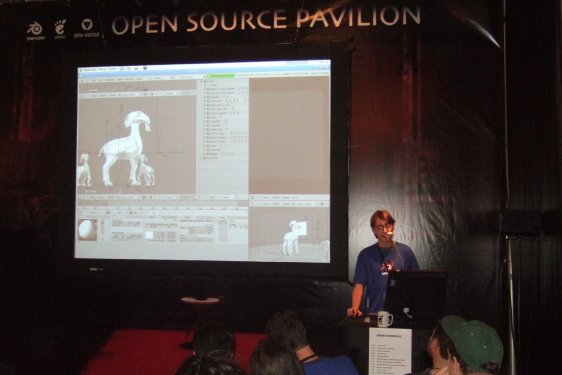
Colin presenting at Siggraph 2006.
Can you also talk about your experience presenting at Siggraph 06 or any other experience at Siggraph 06?
I’m very glad that I was given the opportunity to attend Siggraph and help out at the OpenSource Pavilion booth (Blender booth), because it was really really cool. It was an absolute honor to meet Ton and Andy and Bassam. It was great to just be able to talk with other people who are passionate about Blender and 3D animation. I learned a whole lot, met dozens of people, had some really good conversations and saw some amazing animations. It was a great experience overall – I hope I can attend Siggraph next year. (Or maybe even the Blender Conference in 2007!)


I loved the juicebox animation. I especially liked the title animation with the hyraulic cylinders. Each one popping out of the previous and the whole device reacting was awesome.
I remember just 6 months ago when I decided to finally learn blender. I run my own business so I decided to dedicate two months to learning blender. It was so hard to get at first but there were some great people helping me. blenderchat on irc was awesome. mfoxdogg, briggs, LOD, UnNamed etc.. were huge in helping me out. I would highly recommend getting involved in the irc rooms.
I concur. effstops is a very talented artist i hope to see more. I also agree with ccherrett about the IRC rooms. If you have a question then ask and get an almost immediate response. In fact what i noticed is that tons of people just sit in the room waiting for something interesting to pop up. Usually questions get answered, because there isn’t a lot of other chat going on., which is right cool by me.
Thanks guys. You’re right – when I have a problem I go straight to the forum. I haven’t been using the chat room on irc at all, but it’s really a great alternative, since it can take days to get a reply. I’ll definitely start using it more often. :)
–Colin
Agree, we need a Depth of Field rendering!!!
Hi Colin!
It’s nice to see you here.
As you know, I’ve always liked your works. Your Juice box animation is very funny.
Philippe.
Nice interview. Congrats on that, Colin. Like your work very much!
These interviews really give a nice idea of what kind of people are using Blender. That’s really a good thing.
//Mathias
I totally agree with what Colin has to say about Blender.
I really like how you have put Blender into Reality in Suburban Plight, Colin. Nice work!
It’s nice hearing from you!
I agree, blender needs to render in passes, and a depth of field render would be nice, I also wish it could export as some vector format with multiple frames like flash. As far as I know there is no python script to do this. Colin Levy, you have inspired me to make some animations in blender, I really like suburban plight and now icarus is my second most used program on my computer, just to let you know. You showed me that you know.