

3D Milling Using Blender

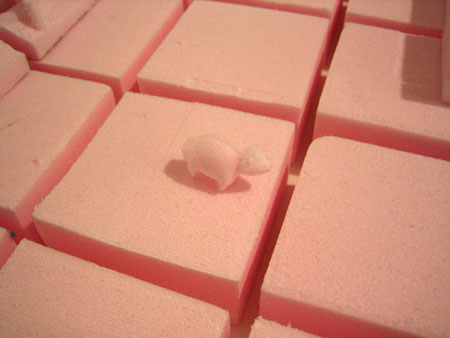 We came across a neat site about Simon Spartalian (a student at the Art Institute of Chicago) and Mike Beradino (a recent graduate of the Art Institute) who are using Blender to offer 3D “prints” of Second Life avatars via a milling process. Blender for milling? I had to ask for more from Simon and Mike who together are Recursive Instruments.
Are you marketing the milling services to anyone that can export to a .obj file? Or just Second Life?
Ideally we would accept any order suitable for our mill and materials in .obj format. For the short-term however we are sticking to Second Life because that’s simply where we are. We may branch out to other systems, but it’s an area where I could see (and encourage) some healthy competition!
From the article, it said that the service would be launched on June 1st. Are you accepting orders now?Â
There is unfortunately a bottleneck here of time. Although the suite of digital tools we use is powerful, we’re not able to produce one-click parts. Manipulation in Blender and precise calibration of the mill both require a lot of time. Not to mention the five or six other programs that are necessary to make all this possible. Right now we’re limited to selecting projects that test our limits and pique our interest; we are fantastically overworked! As we progress we hope to acquire another machine, possibly a rapid prototyper. Once that occurs we will have more resources and time to offer clients.
 Â
Â
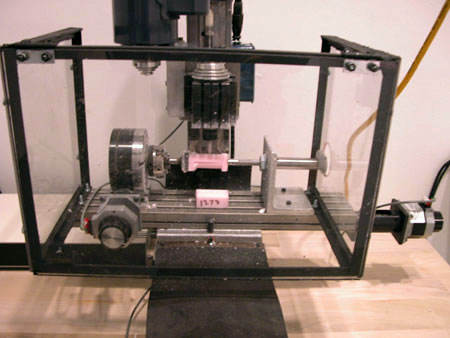
Image: This is a test run of the machine knocking out a translation of the sheep from Sheep Island. The block of foam towards the bottom is a reminder of where to start after we paused for the night.
Other than your blog, do you have images of your work you could share with us (to post)?
We have some high quality scans of our upcoming show on the Learning [Sim name in Second Life] campus. These images are snapshots of Second Life that have been digitally altered to allow a Computerized Numerical Control (CNC) mill to sculpt their contours. The result is a woodblock stamp for traditional ink printing. We present them as scans of those prints. They depict situations you will find everyday in Second Life from play to punishment. They question technology’s changing role in the conception of self.
Of course we noticed that you are using Blender to import .obj files. Why did you choose Blender? Any specific tools you find useful/easy to use?
Honestly Blender was our first pick because it is free. We quickly realized the scope of its power as a mesh editor, but Mike and I are vastly under-utilizing Blender’s capabilities.
Could you go over the details of how you import the data and what you do to clean the mesh?
OGLE captures screenshots of any open GL architecture as a .obj file. For some reason we had trouble getting Blender to recognize these files—sometimes they would import, and sometimes not. So we used Ctrl-View to open and re-save the file as a .obj. This satisfied Blender enough to open the file and edit the scene.
There are two steps to clean a mesh for milling. First, holes showing the interior of the mesh must be sealed. This insures the program that creates our tool-paths reads the mesh as a solid object. Second, any extraneous polygons need to be deleted. That’s it, pretty simple (and often tedious) work.
Image:Â On the left is a screen shot of Second Life. In the center is Blender’s rendering of the .obj file OGLE created from the previous scene. On the right is the end result.

How do you export the mesh from Blender to a lithograph file? I don’t see it in Blender as an export option. Is this a script you wrote or can it be downloaded from somewhere?
In our version (2.41) exporting as a .stl (Stereo Lithograph) is the forth option from the top of the export dialog.
*Editor’s note: Ah, so that’s what .stl can be used for!
Looks like they are off to a good start. The milling process and technique can only get better, especially with Blender being used as part of the work!


Always wanted to see one in action.
um… their output looks awful. Blender is already being used elsewhere to generate g-code directly. They’re basically just using it as a file converter.
I made a blender model of a special type of bike seat (banana style with steering controls attached to the seat), then output the STL file and made a 3D printed model with a Stratasys FDM plastic rapid prototyping machine. It worked great, and gave us a 1/2 scale model to work with and demonstrate our idea (school project).
This is very similar. Keep it up!
amazing !!
i’m from industrial design background. this must be something !!!
I agree with bob. In this case blender is used as a .obj to .stl translator.
On the other hand; the suzanna awards statues at the Bconf are blender modeled stereo lithographed objects.
gracias…
I’ve been cutting wax jewelry models for years.
STL files are all you need for 3d models….
There are lots of programs out there that can convert stl files into tool paths.
DeskProto is probably one of the best.
Matrix3D is one of the most popular jewelry modeling programs…
It’s $6200 or so for one seat an runs on Rhino3D….
Blender could probably do everything that Matrix3d does – perhaps with tons of work
but a whole lot easier on the pocket book.
So far – I got to say Blender Rocks….
I wrote litle script / plugin for blender
have fun with it :)
http://d3p.pl/fb/?subPage=na_tapecie&tag=gcode%blender
it export from blender mesh / edge / edges / outlines / vertex
to 2 / 2.5 and 3d :) cnc ngc standard
Hi there, i am considering getting a new motorbike for my hubby. He however is very worried about what type of risks could take place from biking accidents. See his passion is athletics so if he was disabled, he would likely kill himself, no jokes. Do you think biking injuries most likley occur, or is it usually only death!
Certainly the object would have to be a closed mesh, but would intersecting faces (like where the legs meet the body on the sheep) pose a problem for 3D milling? Also, what are the differences between the STL and OBJ file formats? It seems they are using both formats at different stages in the process. Can anybody elaborate on that?