
Tutorial: Urban Design with Blender

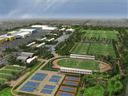 Yorik van Havre wrote us about two of his latest Blender projects: visualisations for large-scale urban development projects (the largest of them measuring 29 million m2).
In this article I’ll try to describe a bit of two large-scale urban development projects that were made mostly with Blender, and the different techniques used to achieve the goal. I tried to write something that would be interesting for both Blender users who don’t do architecture and for architects or urban planners who don´t use Blender. This article is more meant to be an illustration, food for your creativity, than a complete accurate tutorial. Feel free to copy any material found here (but don’t copy the projects, make your own!). These two projects were made at and by Cabeza Sastre, São Paulo, Brazil.
The tutorial (which starts off with a few high-res images and videos of the two projects) is very thorough and explains the different techniques that are required to prepare this kind of presentations:
- Using Google Earth images as a background.
- Creating your models directly in Blender and importing your models from Autocad.
- Two different methods for faking trees and other vegetation.
- Painting people, cars, streetlights.
Yorik talks a lot about the central issue in these kinds of projects: how you can keep the complexity of the model down, but still keep the impression of many objects.
An excellent tutorial that contains many ‘tricks of the trade’. You’ll find it on his website.



Thanks for the Link and Informations about this Amazing Project!!Looks Great and very Interessting!
Amazing, cheers!
Hi Yorik, in case you’re reading, I noticed you were having the problem with the locked track constraint not following the camera properly with dupliverts (i.e. seeing the edges of trees-as-planes instead of them correctly facing the camera). As you know, this is caused by only the original object tracking to the camera, which is inaccurate if the camera has moved so it’s not looking directly at the object.
I think I’ve found a way to work around this problem using a couple of empties, parented and with a Copy Rotation constraint. I put a demo .blend file here: http://mke3.net/blender/etc/track_constraints.blend.zip
cheers and hope this helps
thats an amasing project :) really nice indeed, well done :)
Excellente.
Indeed, truly amazing project!
This is great! Thank you very much! I do architectural modelling myself and this tree thing with just one image laying over the ground is a snappy solution.
Looks like we crashed his site. We’re like a mini slash-dot!
The “Blendernation effect” XD
Fortunately, Yorik has provided a mirror on another server. I’ve updated the links. Enjoy!
Well, Bart told me there would be many people… The blendernation people killed my website :( Actually, I have a daily limit, so tomorrow it’ll be on air again. Matt, that’s an excellent way, i’ll use it instead, now… Thanks all, I’ll try to write more tutorials, I have a couple of ideas in mind, and it looks like many people are interested in doing CAD with Blender… If anyone wants some more information about some particular point, drop a line in my “guestblog”… (click my name here above).
WOW! This will be a great resource for my students. I only wish I had an upper level student that could try this out, but at this point of the school year, something to light a spark for next year…. Thanks much.
good work !
cheers
Irfan
Something to play around with is using Dogwaffle painting program to make the vegitation. It’s particle paint system set right creates some pleasing results.
Very nice. Thanks for letting us all take a look. I do similar work but on a much smaller scale, so am always interested to see this sort of stuff. It’s great to have it written up so nicely as well.
Are you sure about your position with regard to GE copyright? If you’re using their images commercially, then telling the world through your website, you’d want to be pretty sure that you’re covered. Worth a reminder, I thought.
Thanks again.
i like blender