
 Salvatore Russo has updated BlenderCE in three key ways.
1. The website has changed to http://russose.free.fr/.
2. The name has changed to BlenderPocket. And...
3. BlenderPocket is a new version! Images are now supported (for the background, textures, and UV mapping, etc.), and Salvatore believes that the "White screen" bug reported will disappear (the BlenderPocket community will know for sure once the feedback starts rolling into the BlenderPocket forums.
The big difference will be that BlenderCE becomes "Blender Pocket". BlenderCE is related to "WindowsCE" and it is not the aim of this project... I will submit the source in few days... and as soon as the source is submitted, I hope some people will take it to port Blender to other devices: PocketPC running Linux, Zaurus... or improve the Windows mobile version.
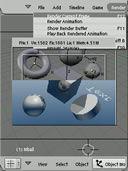
There are also new (and phenomenal) screenshots, so if you have a PocketPC, take a look and post about it on the BlenderPocket forums!

10 Comments
will BlenderPocket be merged with the official bf-blender CVS tree?
Cool... i think i need to buy a pocket pc :)
I just love that picture on the front page! it looks like it runs 640*480. You have doen a great job Salvatore...
Madman is the author of this image. But it is a montage because Blender Pocket as no splash screen today (to save resources but I should change this, it is funny to have a splash screen!).
For the cvs-tree, I don’t know… I do my best to isolate the few changes but it is still not perfect. The foundation could decide to bring the changes in the cvs tree (with local #if defined). But maybe they don’t plan to do it because Blender Pocket is only an experimental version and the official CVS tree should only contain 100% quality things…
As soon as the 2.42 version will be available, I will make Blender Pocket evolve to this ver-sion and I will probably need to better isolate changes and bring them to a minimum… the ultimate goal would be to compile Blender Pocket on top of Blender sources with No or just few changes.
Salvatore
Must be a world first.
Thanks:=)
Madman is the author of this image. But it is a montage because Blender Pocket as no splash screen today (to save resources but I should change this, it is funny to have a splash screen!).
For the cvs-tree, I don’t know… I do my best to isolate the few changes but it is still really not perfect. The foundation could decide to bring the changes in the cvs tree (with local #if defined). But I can also imagine that they don’t want to do it because Blender Pocket is only an experimental version and the official CVS tree should only contain 100% quality things…
As soon as the 2.42 version will be available, I will make Blender Pocket evolve to this new version and I will probably need to better isolate my changes and bring them to a minimum… the ultimate goal would be to compile Blender Pocket on top of Blender sources with No/Few changes.
Salvatore
Any chance we can get an installer guide? I'm a mac user and I'm trying to figure out how to intall this from the .exe file, but Missing Sync isn't going to let me install the .exe file. And where am I suposed to put all these .dll files?
Hi,
You don't need to install BlenderPocket. Just copy the BlenderPocket directory where you want in you PocketPC.
Salvatore
is anyone still doing anything with pocket blender?
I put it on my ATT Tilt...it runs...
It doesn't close very gracefully, have to soft reset to make the device run correctly [other functions, like web access]
Also, I am unable to get the transform gizmo to work correctly, I can move things around, but am unable to switch to scale or rotate. Also, unable to select things.
I don't use desktop Blender, I am a Maya user, so either Pocket Blender needs some tweeks, or, I have no clue how to use it.
I would love some comments and or tips.
thanks.
could it be possible to port this to the iphone???